AI Analytics Assistant

Sense

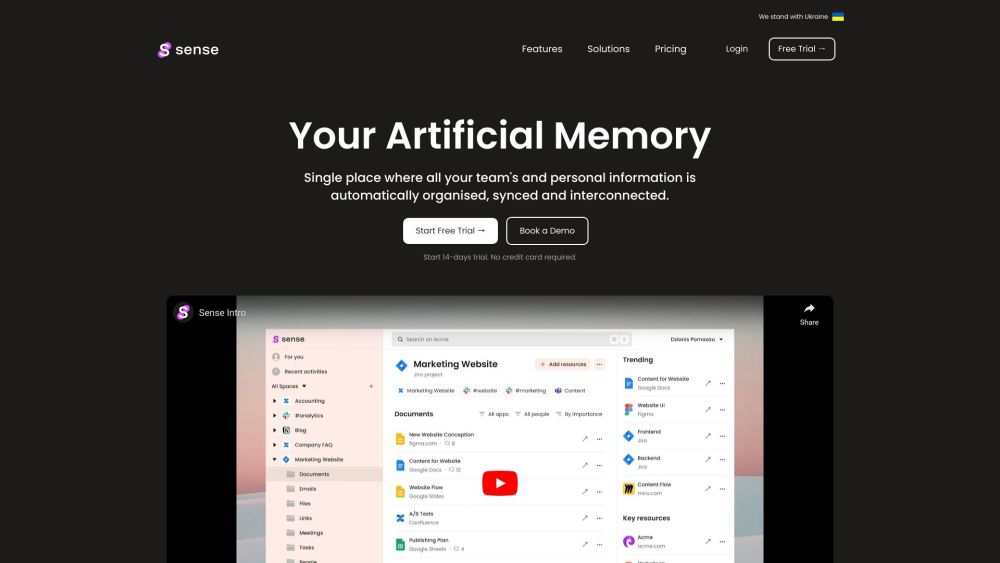
Sense is an artificial memory and organization tool that automatically converts work chaos into sensible order. It is a single place where all your team's and personal information is automatically organized, synced, and interconnected.

Sense website preview

Sense Website screenshot

Discover Sense: Your Intelligent Work Organizer

Sense is a cutting-edge AI-powered tool designed to bring clarity to your work environment by seamlessly organizing and connecting all your team’s and personal information. With Sense, chaos turns into order, providing a centralized hub where everything is automatically categorized, synchronized, and easily accessible.

Getting Started with Sense

To begin using Sense, simply sign up for a free trial on the website or request access. Integrate the various apps and tools your team relies on, and Sense will take care of the rest. It will automatically categorize, synchronize, and link all your documents, files, and conversations. With Sense’s powerful unified search, you can find anything across all your connected apps and documents. Additionally, Sense suggests sharing relevant information with the appropriate team members, ensuring that nothing important is overlooked.

Key Features of Sense

Automated organization of documents, links, files, and communications

Unified search that spans across all integrated apps and files

Smart sharing suggestions to keep everyone informed

Centralized project management with self-organizing Spaces

Automatic linking of related content and discussions

Personalized hub for key tasks and notifications

Convenient Chrome extension for quick search and context overview

Practical Applications of Sense

Streamlining and synchronizing personal and team information

Effortless searching across various applications and documents

Facilitating informed communication among team members

Simplifying work processes by reducing manual intervention

Product source: Sense official website. Check the provider for current plans, limits and availability.

FAQ

Sense questions and answers

Product context and practical checks for evaluating Sense.

What is Sense used for?

Sense is an artificial memory and organization tool that automatically converts work chaos into sensible order. It is a single place where all your team's and personal information is automatically organized, synced, and interconnected.

How do I get started with Sense?

To begin using Sense, simply sign up for a free trial on the website or request access. Integrate the various apps and tools your team relies on, and Sense will take care of the rest. It will automatically categorize, synchronize, and link all your documents, files, and conversations. With Sense’s powerful unified search, you can find anything across all your connected apps and documents. Additionally, Sense suggests sharing relevant information with the appropriate team members, ensuring that nothing important is overlooked.

Which capabilities are described for Sense?

Automated organization of documents, links, files, and communicationsUnified search that spans across all integrated apps and filesSmart sharing suggestions to keep everyone informedCentralized project management with self-organizing SpacesAutomatic linking of related content and discussionsPersonalized hub for key tasks and notificationsConvenient Chrome extension for quick search and context overview

What projects can I evaluate Sense for?

Streamlining and synchronizing personal and team informationEffortless searching across various applications and documentsFacilitating informed communication among team membersSimplifying work processes by reducing manual intervention Contact Sense Support For more details, visit the support page. Sense Company Details Company Name: Sense Sense Login Login here: https://senseai.online Sense Sign-Up Sign up here: https://senseai.online/signup Sense Pricing View pricing details: Pricing page Sense on LinkedIn Follow on LinkedIn: LinkedIn Sense on Twitter Follow on Twitter: Twitter

What should I compare before choosing a Sense plan?

View pricing details: Pricing page Confirm current prices and allowances on the provider’s website before purchasing.

What inputs should I prepare for a Sense trial?

Look for text prompts, image references, masks or sketches as appropriate. Compare composition control, supported upload types and the ability to revise a selected area.

How can I check the quality of a Sense result?

Inspect text, hands, edges, reflections and repeated objects at full size. Check that important product or brand details survive editing.

Which export options should I check in Sense?

Compare pixel dimensions, transparency, file formats and any enlargement options. Confirm that the downloaded result works in your design or publishing software.

What is a practical way to test Sense against alternatives?

Prepare a brief with a subject, composition, lighting and required output size. Test a first generation and a targeted revision to see how much control you retain.

Where is the official Sense website?

The website linked from this profile is https://www.promptdodo.com. Use the provider’s own documentation, account area and support channels to confirm current product details.

Visit Sense