AI Product Description Generator

ReTime

ReTime: Free online scheduling software to effortlessly manage meetings, appointments, and team discussions. Redefine your routine with ReTime!

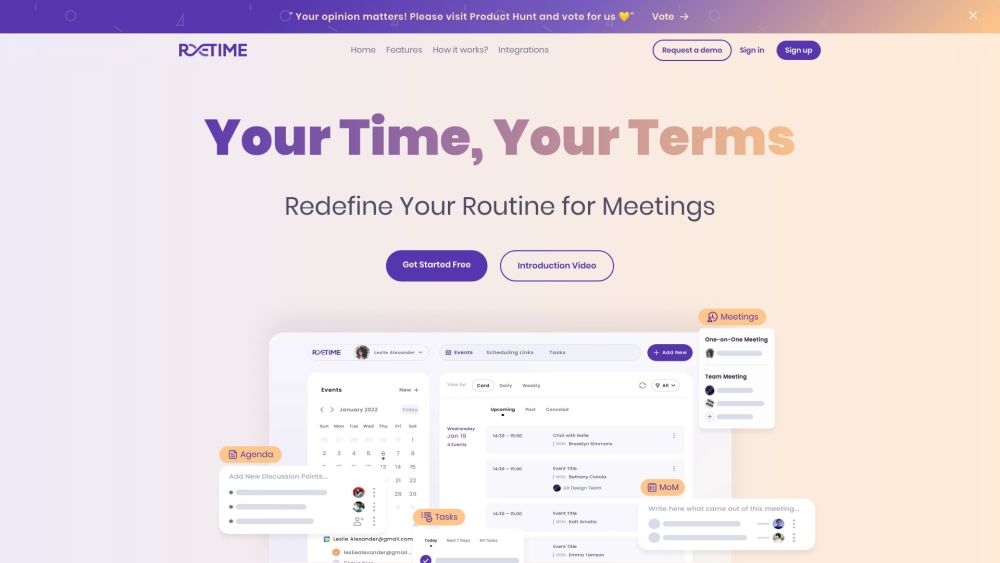
ReTime website preview
Retime Website screenshot

Introducing ReTime: Your Ultimate Solution for Online Scheduling, Meeting, and Team Management

ReTime is a cutting-edge free online scheduling platform designed to revolutionize the way you manage your appointments, meetings, and team collaborations. With its intuitive interface and powerful features, ReTime offers a seamless scheduling and team coordination experience that will transform the way you organize your daily routine.

Effortless Scheduling & Team Coordination Made Simple

Say goodbye to scheduling hassles and coordination chaos with ReTime. Our platform allows you to effortlessly schedule meetings, coordinate with your team, and stay on top of your agenda with ease. Whether you are a business professional, a remote worker, or an organization looking to streamline your scheduling process, ReTime has got you covered.

Key Features of ReTime

Agenda Management: Keep track of discussion points and agenda items for team meetings.

Action Items Tracking: Assign and monitor tasks seamlessly for effective action planning.

Flexible Availabilities: Set your preferred schedule or sync effortlessly with Google Calendar.

Customizable Options: Tailor meeting preferences and settings to suit your unique needs.

Date Override Functionality: Override default availability for specific dates as needed.

Calendar Integration: Sync with popular calendars like Google Calendar, Zoho, and Office365 for seamless scheduling.

Time Zone Management: Easily manage meetings across different time zones for global collaboration.

Unlocking the Potential of ReTime for Various Use Cases

Businesses and professionals seeking a powerful yet simple scheduling tool for their meetings and appointments.

Teams and remote workers looking to enhance collaboration and communication efficiency.

Organizations and individuals aiming to eliminate scheduling conflicts and last-minute meetings.

Companies and individuals desiring a consolidated view of their schedules across multiple calendars and platforms.

Product source: ReTime official website. Check the provider for current plans, limits and availability.

FAQ

ReTime questions and answers

Product context and practical checks for evaluating ReTime.

What is ReTime used for?

ReTime: Free online scheduling software to effortlessly manage meetings, appointments, and team discussions. Redefine your routine with ReTime!

How do I get started with ReTime?

Open the official ReTime website and identify the workflow that matches your task. Choose a small reproducible bug with an existing failing check. Measure whether the tool fixes the cause, preserves behavior and produces a reviewable change.

Which capabilities are described for ReTime?

Agenda Management: Keep track of discussion points and agenda items for team meetings.Action Items Tracking: Assign and monitor tasks seamlessly for effective action planning.Flexible Availabilities: Set your preferred schedule or sync effortlessly with Google Calendar.Customizable Options: Tailor meeting preferences and settings to suit your unique needs.Date Override Functionality: Override default availability for specific dates as needed.Calendar Integration: Sync with popular calendars like Google Calendar, Zoho, and Office365 for seamless scheduling.Time Zone Management: Easily manage meetings across different time zones for global collaboration.

What projects can I evaluate ReTime for?

Businesses and professionals seeking a powerful yet simple scheduling tool for their meetings and appointments.Teams and remote workers looking to enhance collaboration and communication efficiency.Organizations and individuals aiming to eliminate scheduling conflicts and last-minute meetings.Companies and individuals desiring a consolidated view of their schedules across multiple calendars and platforms. Contact Retime Support & Company Information For customer service inquiries, reach out to Retime at [email protected]. Company name: Retime, Inc. Retime Login Link: https://app.retime.so/login Retime Sign up Link: https://app.retime.so/signup Retime Linkedin Link: https://www.linkedin.com/company/myretime Retime Twitter Link: https://twitter.com/myretime Retime Instagram Link: https://www.instagram.com/myretime/

What should I compare before choosing a ReTime plan?

Check ReTime’s current pricing page for included usage, renewal terms and any credit charges. Compare the cost of a usable result, including retries, rather than assuming that account registration includes free usage.

What inputs should I prepare for a ReTime trial?

Compare repository access, context limits, supported languages and tool permissions. Check whether the assistant can read relevant files and run your existing checks.

How can I check the quality of a ReTime result?

Review the diff, run tests and inspect error handling and dependency changes. Generated code should meet the same review standard as a human contribution.

Which export options should I check in ReTime?

Prefer changes you can inspect and keep in version control. Check whether code, tests and configuration can be exported without depending on a hosted preview.

What is a practical way to test ReTime against alternatives?

Choose a small reproducible bug with an existing failing check. Measure whether the tool fixes the cause, preserves behavior and produces a reviewable change.

Where is the official ReTime website?

The website linked from this profile is https://retime.so. Use the provider’s own documentation, account area and support channels to confirm current product details.

Visit ReTime