Resume Builder

ResumeBoost

ResumeBoost: Effortlessly create standout resumes with our intuitive website tools. Elevate your job search and impress employers today!

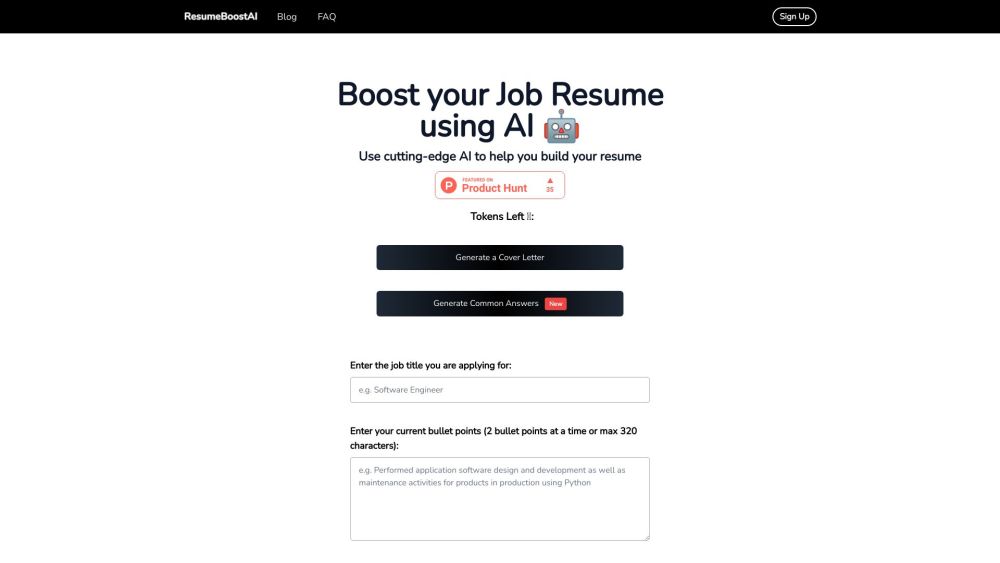
ResumeBoost website preview

ResumeBoost Website screenshot

Introducing ResumeBoost

ResumeBoost is an innovative platform designed to simplify the process of creating standout resumes. With a variety of powerful tools and user-friendly features, ResumeBoost enables job seekers, students, and professionals to craft resumes that not only highlight their skills and experience but also catch the eye of potential employers.

Getting Started with ResumeBoost

1. Create a free account on the ResumeBoost platform. 2. Browse through an extensive selection of resume templates and select the one that best suits your needs. 3. Enter your details, including personal information, education history, work experience, and skills. 4. Customize the template by adjusting the design, layout, and color scheme to reflect your personal style. 5. Enhance your resume using the platform's expert tips and recommendations. 6. Save your completed resume and download it as a PDF for easy sharing.

Key Features of ResumeBoost

Diverse Collection of Professional Templates

User-Friendly Tools for Effortless Editing

Flexible Design Options for Personalized Resumes

Content Improvement Suggestions

PDF Export for High-Quality Downloads

Who Can Benefit from ResumeBoost?

Aspiring Professionals Seeking Job Opportunities

Students Preparing for Internships and Part-Time Jobs

Career Professionals Pursuing Advancement

  • About ResumeBoost

    Company Name: ResumeBoostAI

  • Explore ResumeBoost Pricing

    Find detailed pricing information here.

  • Connect with ResumeBoost on LinkedIn

    Follow us on LinkedIn: ResumeBoostAI LinkedIn

  • Follow ResumeBoost on Twitter

    Stay updated by following us on Twitter: ResumeBoostAI Twitter

Product source: ResumeBoost official website. Check the provider for current plans, limits and availability.

FAQ

ResumeBoost questions and answers

Product context and practical checks for evaluating ResumeBoost.

What is ResumeBoost used for?

ResumeBoost: Effortlessly create standout resumes with our intuitive website tools. Elevate your job search and impress employers today!

How do I get started with ResumeBoost?

1. Create a free account on the ResumeBoost platform. 2. Browse through an extensive selection of resume templates and select the one that best suits your needs. 3. Enter your details, including personal information, education history, work experience, and skills. 4. Customize the template by adjusting the design, layout, and color scheme to reflect your personal style. 5. Enhance your resume using the platform's expert tips and recommendations. 6. Save your completed resume and download it as a PDF for easy sharing.

Which capabilities are described for ResumeBoost?

Diverse Collection of Professional TemplatesUser-Friendly Tools for Effortless EditingFlexible Design Options for Personalized ResumesContent Improvement SuggestionsPDF Export for High-Quality Downloads

What should I compare before choosing a ResumeBoost plan?

Find detailed pricing information here. Confirm current prices and allowances on the provider’s website before purchasing.

What inputs should I prepare for a ResumeBoost trial?

Check supported documents, datasets and source access. Establish whether the product can inspect your actual material rather than answer from general knowledge.

How can I check the quality of a ResumeBoost result?

Follow citations to the original source, recalculate important numbers and check the date and scope of the evidence. Distinguish an explanation from a verified result.

Which export options should I check in ResumeBoost?

Look for usable citations, tables, downloadable data and reproducible steps. A clear answer should let another person inspect how the conclusion was reached.

What is a practical way to test ResumeBoost against alternatives?

Choose a question with known sources and a checkable result. Compare citation accuracy, omissions and reproducibility rather than response length.

What should I review before uploading material to ResumeBoost?

Read the provider’s rules on access, retention, deletion and use of uploaded material. Start with a non-confidential sample that you have permission to use.

Where is the official ResumeBoost website?

The website linked from this profile is https://resumeboostai.com. Use the provider’s own documentation, account area and support channels to confirm current product details.

Visit ResumeBoost