AI Product Description Generator

QuickRedact

QuickRedact: Instantly hide faces in any photo with advanced detection technology. Secure privacy effortlessly with our powerful, automatic tool.

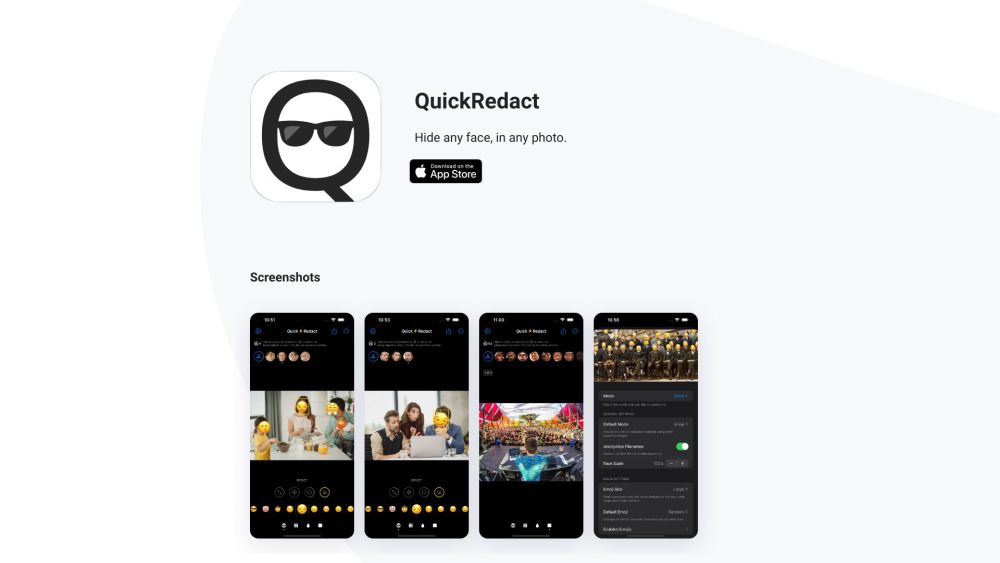
QuickRedact website preview

QuickRedact Website screenshot

Introducing QuickRedact: Your Ultimate Auto Face-Hiding Tool with Cutting-Edge Detection Technology

QuickRedact is a revolutionary tool designed to effortlessly conceal faces in your photos with precision and speed. Leveraging advanced face detection technology, QuickRedact ensures that sensitive information remains protected while maintaining the integrity of your images.

Simplified Usage with Powerful Features

Utilizing QuickRedact is a breeze. Simply import your photos, and let the app automatically identify and hide faces. Customize the obscured faces with a range of effects like Emojis, Blur, Pixellation, or Shapes. Real-time previews guarantee that your final results meet your expectations. QuickRedact operates offline, safeguarding your privacy by eliminating all metadata from your edited photos.

Discover QuickRedact's Key Attributes

Unveiling the core features of QuickRedact:

  • State-of-the-art face detection: Detects faces in your photos, even in large groups.
  • Support for multiple photos: Process numerous images simultaneously.
  • Advanced customization choices: Enhance hidden faces with various effects.
  • Swift on-device image processing: Utilizes device capabilities for instant previews.
  • Complete offline functionality: Operates independently, ensuring data security.

Applications of QuickRedact

QuickRedact caters to diverse scenarios including:

  • Protecting privacy on social media images.
  • Preserving anonymity in sensitive visuals.
  • Respecting privacy in group photos by concealing faces.
  • Censoring faces for legal or ethical considerations.
  • Redacting confidential details in official images.

For Support and Inquiries

For QuickRedact support and customer service, contact [email protected].

Product source: QuickRedact official website. Check the provider for current plans, limits and availability.

FAQ

QuickRedact questions and answers

Product context and practical checks for evaluating QuickRedact.

What is QuickRedact used for?

QuickRedact: Instantly hide faces in any photo with advanced detection technology. Secure privacy effortlessly with our powerful, automatic tool.

How do I get started with QuickRedact?

Open the official QuickRedact website and identify the workflow that matches your task. Prepare a brief with a subject, composition, lighting and required output size. Test a first generation and a targeted revision to see how much control you retain.

Which capabilities are described for QuickRedact?

Utilizing QuickRedact is a breeze. Simply import your photos, and let the app automatically identify and hide faces. Customize the obscured faces with a range of effects like Emojis, Blur, Pixellation, or Shapes. Real-time previews guarantee that your final results meet your expectations. QuickRedact operates offline, safeguarding your privacy by eliminating all metadata from your edited photos.

What projects can I evaluate QuickRedact for?

QuickRedact caters to diverse scenarios including:Protecting privacy on social media images.Preserving anonymity in sensitive visuals.Respecting privacy in group photos by concealing faces.Censoring faces for legal or ethical considerations.Redacting confidential details in official images.

What should I compare before choosing a QuickRedact plan?

Check QuickRedact’s current pricing page for included usage, renewal terms and any credit charges. Compare the cost of a usable result, including retries, rather than assuming that account registration includes free usage.

What inputs should I prepare for a QuickRedact trial?

Look for text prompts, image references, masks or sketches as appropriate. Compare composition control, supported upload types and the ability to revise a selected area.

How can I check the quality of a QuickRedact result?

Inspect text, hands, edges, reflections and repeated objects at full size. Check that important product or brand details survive editing.

Which export options should I check in QuickRedact?

Compare pixel dimensions, transparency, file formats and any enlargement options. Confirm that the downloaded result works in your design or publishing software.

What is a practical way to test QuickRedact against alternatives?

Prepare a brief with a subject, composition, lighting and required output size. Test a first generation and a targeted revision to see how much control you retain.

Where is the official QuickRedact website?

The website linked from this profile is https://quickredactapp.com. Use the provider’s own documentation, account area and support channels to confirm current product details.

Visit QuickRedact