AI Recruiting

Prog.AI - Chrome Extension

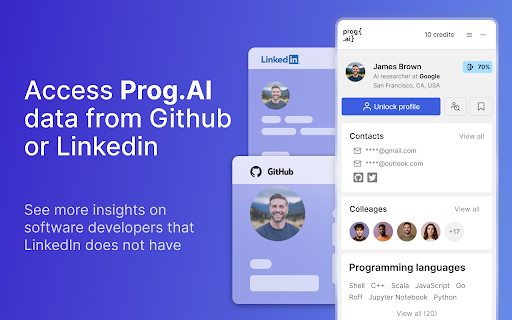
Recruit top software engineers fast with Prog.AI Chrome Extension. Get detailed insights instantly, streamline hiring, and make data-driven decisions effortlessly!

Prog.AI - Chrome Extension website preview

Prog.AI - Chrome Extension Website screenshot

What is the Prog.AI Chrome Extension?

The Prog.AI Chrome Extension is a powerful tool designed to help recruiters discover comprehensive insights into software engineers and rapidly build a list of potential candidates. It streamlines the recruitment process by offering in-depth analysis, making it easier to find the right talent faster.

How to use the Prog.AI Chrome Extension?

Getting started with Prog.AI is straightforward. After signing up, recruiters simply upload the profiles of engineers they wish to evaluate. The platform then processes these profiles, delivering detailed insights into each candidate's skills, experience, and other relevant metrics.

Core Features of Prog.AI Chrome Extension

Comprehensive insights on software engineers

Efficient bulk candidate list generation

Use Cases for Prog.AI Chrome Extension

High-volume recruiting for software engineering roles

Product source: Prog.AI - Chrome Extension official website. Check the provider for current plans, limits and availability.

FAQ

Prog.AI - Chrome Extension questions and answers

Product context and practical checks for evaluating Prog.AI - Chrome Extension.

What is Prog.AI - Chrome Extension used for?

Recruit top software engineers fast with Prog.AI Chrome Extension. Get detailed insights instantly, streamline hiring, and make data-driven decisions effortlessly!

How do I get started with Prog.AI - Chrome Extension?

Getting started with Prog.AI is straightforward. After signing up, recruiters simply upload the profiles of engineers they wish to evaluate. The platform then processes these profiles, delivering detailed insights into each candidate's skills, experience, and other relevant metrics.

Which capabilities are described for Prog.AI - Chrome Extension?

Comprehensive insights on software engineersEfficient bulk candidate list generation

What projects can I evaluate Prog.AI - Chrome Extension for?

High-volume recruiting for software engineering roles

What should I compare before choosing a Prog.AI - Chrome Extension plan?

Check Prog.AI - Chrome Extension’s current pricing page for included usage, renewal terms and any credit charges. Compare the cost of a usable result, including retries, rather than assuming that account registration includes free usage.

What inputs should I prepare for a Prog.AI - Chrome Extension trial?

Compare repository access, context limits, supported languages and tool permissions. Check whether the assistant can read relevant files and run your existing checks.

How can I check the quality of a Prog.AI - Chrome Extension result?

Review the diff, run tests and inspect error handling and dependency changes. Generated code should meet the same review standard as a human contribution.

Which export options should I check in Prog.AI - Chrome Extension?

Prefer changes you can inspect and keep in version control. Check whether code, tests and configuration can be exported without depending on a hosted preview.

What is a practical way to test Prog.AI - Chrome Extension against alternatives?

Choose a small reproducible bug with an existing failing check. Measure whether the tool fixes the cause, preserves behavior and produces a reviewable change.

Where is the official Prog.AI - Chrome Extension website?

The website linked from this profile is https://chromewebstore.google.com/detail/progai-in-depth-insights/pplkiigdcpbacikbalacopmaklichaod. Use the provider’s own documentation, account area and support channels to confirm current product details.

Visit Prog.AI - Chrome Extension