AI Analytics Assistant

Privacy Shield

Privacy Shield - Chrome Extension: Your AI companion for enhanced browser privacy. Protect your data, block trackers, and browse securely with ease.

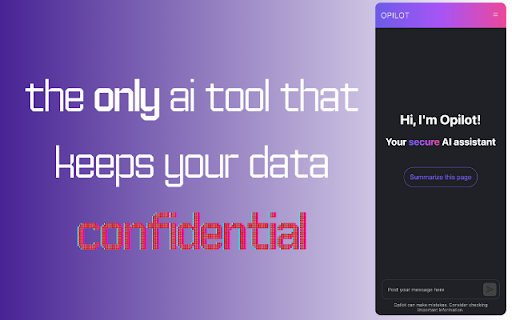
Privacy Shield website preview

Privacy Shield - Chrome Extension Website screenshot

What is the Privacy Shield AI Chrome Extension?

Privacy Shield is an intelligent AI-powered tool designed to enhance your browser's privacy and security. It gives you full control over your personal data, ensuring that your online activities remain private and protected, all while seamlessly integrating with your browsing experience.

How to Use the Privacy Shield AI Chrome Extension?

To get started, install the Privacy Shield extension from the Chrome Web Store, adjust your privacy settings to suit your preferences, and let the AI do the rest. It will automatically safeguard your browsing without any further hassle.

Core Features of the Privacy Shield AI Chrome Extension

Data Ownership

Stay in control of your personal data. Privacy Shield empowers you to manage what information is shared and what remains private, preventing unauthorized access.

Privacy Safeguarding

With robust encryption and advanced security features, Privacy Shield protects you from online tracking, ensuring that your digital footprint remains private.

Effortless Integration

Privacy Shield integrates seamlessly into your browser, offering a smooth, uninterrupted browsing experience while maintaining high-level privacy protection.

Use Cases for Privacy Shield AI Chrome Extension

Securing Sensitive Information During Online Transactions

Keep your payment details and personal information secure while shopping online, preventing identity theft and fraud.

Protecting Browsing History from Third-Party Trackers

Stop advertisers and other third-party trackers from accessing your browsing history and personal preferences, preserving your online anonymity.

Product source: Privacy Shield official website. Check the provider for current plans, limits and availability.

FAQ

Privacy Shield questions and answers

Product context and practical checks for evaluating Privacy Shield.

What is Privacy Shield used for?

Privacy Shield - Chrome Extension: Your AI companion for enhanced browser privacy. Protect your data, block trackers, and browse securely with ease.

How do I get started with Privacy Shield?

To get started, install the Privacy Shield extension from the Chrome Web Store, adjust your privacy settings to suit your preferences, and let the AI do the rest. It will automatically safeguard your browsing without any further hassle.

Which capabilities are described for Privacy Shield?

Data OwnershipStay in control of your personal data. Privacy Shield empowers you to manage what information is shared and what remains private, preventing unauthorized access. Privacy SafeguardingWith robust encryption and advanced security features, Privacy Shield protects you from online tracking, ensuring that your digital footprint remains private. Effortless IntegrationPrivacy Shield integrates seamlessly into your browser, offering a smooth, uninterrupted browsing experience while maintaining high-level privacy protection.

What projects can I evaluate Privacy Shield for?

Securing Sensitive Information During Online TransactionsKeep your payment details and personal information secure while shopping online, preventing identity theft and fraud. Protecting Browsing History from Third-Party TrackersStop advertisers and other third-party trackers from accessing your browsing history and personal preferences, preserving your online anonymity.

What should I compare before choosing a Privacy Shield plan?

Check Privacy Shield’s current pricing page for included usage, renewal terms and any credit charges. Compare the cost of a usable result, including retries, rather than assuming that account registration includes free usage.

What inputs should I prepare for a Privacy Shield trial?

Check supported documents, datasets and source access. Establish whether the product can inspect your actual material rather than answer from general knowledge.

How can I check the quality of a Privacy Shield result?

Follow citations to the original source, recalculate important numbers and check the date and scope of the evidence. Distinguish an explanation from a verified result.

Which export options should I check in Privacy Shield?

Look for usable citations, tables, downloadable data and reproducible steps. A clear answer should let another person inspect how the conclusion was reached.

What is a practical way to test Privacy Shield against alternatives?

Choose a question with known sources and a checkable result. Compare citation accuracy, omissions and reproducibility rather than response length.

Where is the official Privacy Shield website?

The website linked from this profile is https://chromewebstore.google.com/detail/opilot-ai-assistant-exten/lamegohcmdnmiagnngemhibfhbcpeejk. Use the provider’s own documentation, account area and support channels to confirm current product details.

Visit Privacy Shield