AI Advertising Assistant

Pipedata AI

Boost Google Ads performance and personalize your site with Pipedata AI. Create relevant landing pages for every keyword effortlessly. No developers needed!

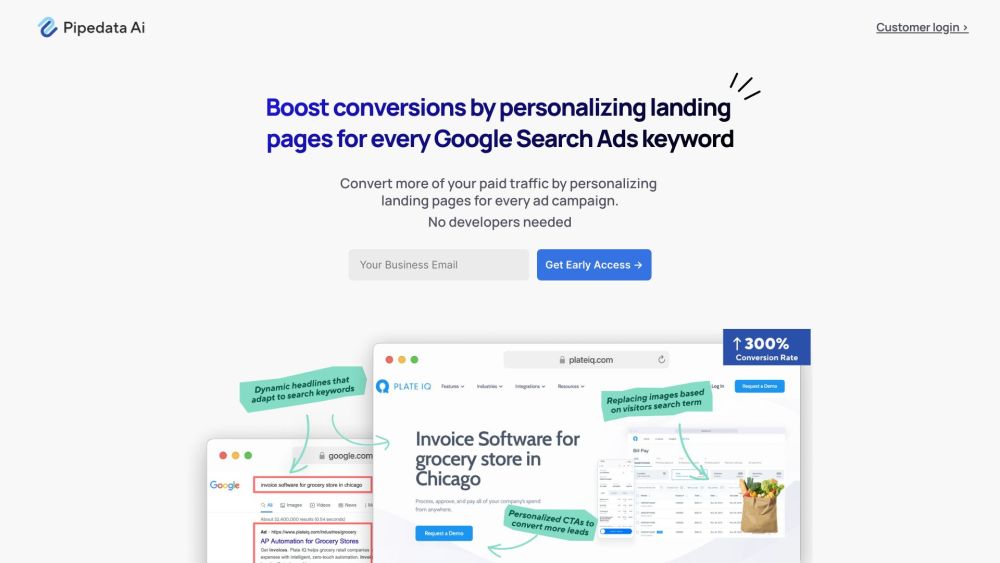
Pipedata AI website preview

Pipedata AI Website screenshot

What is Pipedata AI?

Pipedata AI is a cutting-edge platform designed to help businesses enhance their website personalization and maximize the effectiveness of their Google Ads campaigns. By enabling the creation of tailored landing pages for each keyword in Google Search Ads, Pipedata AI significantly boosts conversion rates. The platform is user-friendly and requires no developer intervention, making it accessible to businesses of all scales.

How to use Pipedata AI?

To get started with Pipedata AI, follow these simple steps: 1. Log in to your Pipedata AI account. 2. Identify the keywords targeted in your Google Search Ads. 3. Choose the elements you wish to personalize on your website, such as headlines, images, call-to-actions, pricing details, testimonials, and more. 4. Customize the content for each keyword to develop unique landing pages. 5. Publish these personalized pages and monitor their performance. Using Pipedata AI, you can optimize your website for each Google Search Ad, driving higher conversions and enhancing your paid digital acquisition strategies effortlessly.

Pipedata AI's Core Features

Personalize headlines and copy on web pages

Customize images for different keywords

Optimize call-to-actions (CTAs) based on keywords

Tailor pricing information for each keyword

Modify testimonials and content posts

Customize feature sets and banners/logos

Self-service platform without the need for developers

Pipedata AI's Use Cases

Boost conversion rates from Google Search Ads

Enhance the performance of paid digital acquisition strategies

Create personalized and adaptive web experiences

Drive profitable growth on a global scale

Effectively scale Google Search Ads

Improve landing page relevance for ad clicks

Product source: Pipedata AI official website. Check the provider for current plans, limits and availability.

FAQ

Pipedata AI questions and answers

Product context and practical checks for evaluating Pipedata AI.

What is Pipedata AI used for?

Boost Google Ads performance and personalize your site with Pipedata AI. Create relevant landing pages for every keyword effortlessly. No developers needed!

How do I get started with Pipedata AI?

To get started with Pipedata AI, follow these simple steps: 1. Log in to your Pipedata AI account. 2. Identify the keywords targeted in your Google Search Ads. 3. Choose the elements you wish to personalize on your website, such as headlines, images, call-to-actions, pricing details, testimonials, and more. 4. Customize the content for each keyword to develop unique landing pages. 5. Publish these personalized pages and monitor their performance. Using Pipedata AI, you can optimize your website for each Google Search Ad, driving higher conversions and enhancing your paid digital acquisition strategies effortlessly.

Which capabilities are described for Pipedata AI?

Personalize headlines and copy on web pagesCustomize images for different keywordsOptimize call-to-actions (CTAs) based on keywordsTailor pricing information for each keywordModify testimonials and content postsCustomize feature sets and banners/logosSelf-service platform without the need for developers

What projects can I evaluate Pipedata AI for?

Boost conversion rates from Google Search AdsEnhance the performance of paid digital acquisition strategiesCreate personalized and adaptive web experiencesDrive profitable growth on a global scaleEffectively scale Google Search AdsImprove landing page relevance for ad clicks Pipedata AI Company Pipedata AI Company name: Pipedata. Pipedata AI Login Pipedata AI Login Link: https://app.pipedata.co/login

What should I compare before choosing a Pipedata AI plan?

Check Pipedata AI’s current pricing page for included usage, renewal terms and any credit charges. Compare the cost of a usable result, including retries, rather than assuming that account registration includes free usage.

What inputs should I prepare for a Pipedata AI trial?

Compare repository access, context limits, supported languages and tool permissions. Check whether the assistant can read relevant files and run your existing checks.

How can I check the quality of a Pipedata AI result?

Review the diff, run tests and inspect error handling and dependency changes. Generated code should meet the same review standard as a human contribution.

Which export options should I check in Pipedata AI?

Prefer changes you can inspect and keep in version control. Check whether code, tests and configuration can be exported without depending on a hosted preview.

What is a practical way to test Pipedata AI against alternatives?

Choose a small reproducible bug with an existing failing check. Measure whether the tool fixes the cause, preserves behavior and produces a reviewable change.

Where is the official Pipedata AI website?

The website linked from this profile is https://ai.pipedata.co. Use the provider’s own documentation, account area and support channels to confirm current product details.

Visit Pipedata AI