AI Email Assistant

Persado Pro - Chrome Extension

Supercharge your email engagement with Persado Pro - Chrome Extension. Harness the power of AI subject lines for maximum impact. Boost your results now!

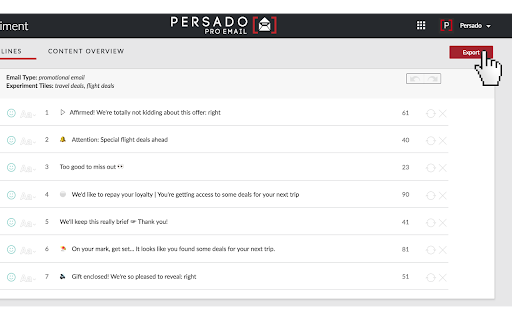
Persado Pro - Chrome Extension website preview

Persado Pro - Chrome Extension Website screenshot

Introducing Persado Pro - Chrome Extension: AI Subject Lines to Boost Email

Discover the power of Persado Pro, an AI-driven chrome extension designed to optimize email subject lines for maximum impact and engagement.

Elevate Your Email Game with Persado Pro

Persado Pro is your secret weapon for crafting captivating subject lines that grab attention and drive results. With its seamless integration into your Chrome browser, this innovative extension takes the guesswork out of subject line optimization.

Effortless Setup and Testing

Installing the Persado Connect chrome extension is a breeze, and within seconds, you can set up subject line tests to determine the most effective approach for your audience. No complex configurations or technical expertise required.

Unlock Persado Pro's Core Features

Machine-generated subject lines

Persado Pro's AI technology generates compelling subject lines that resonate with your recipients, increasing open rates and click-through rates.

Quick and easy A/B testing setup

With Persado Pro, conducting A/B tests has never been easier. Compare different subject line variations effortlessly to optimize your email campaigns.

Automated result tracking

Persado Pro automatically tracks and analyzes the performance of your subject line tests, providing valuable insights to refine your email marketing strategy.

Unleash the Potential of Persado Pro

Increase open rates and click-through rates

Persado Pro empowers marketers to achieve higher engagement rates by leveraging AI-generated subject lines that captivate recipients and drive action.

Conduct multi-variant A/B tests quickly

Save time and effort with Persado Pro's efficient multi-variant A/B testing capabilities. Easily compare and optimize different subject line variations to maximize the impact of your email campaigns.

Product source: Persado Pro - Chrome Extension official website. Check the provider for current plans, limits and availability.

FAQ

Persado Pro - Chrome Extension questions and answers

Product context and practical checks for evaluating Persado Pro - Chrome Extension.

What is Persado Pro - Chrome Extension used for?

Supercharge your email engagement with Persado Pro - Chrome Extension. Harness the power of AI subject lines for maximum impact. Boost your results now!

How do I get started with Persado Pro - Chrome Extension?

Open the official Persado Pro - Chrome Extension website and identify the workflow that matches your task. Use a real brief and a short source document. Compare factual accuracy, structure and editing time rather than accepting the longest or most confident draft.

Which capabilities are described for Persado Pro - Chrome Extension?

Machine-generated subject lines Persado Pro's AI technology generates compelling subject lines that resonate with your recipients, increasing open rates and click-through rates. Quick and easy A/B testing setup With Persado Pro, conducting A/B tests has never been easier. Compare different subject line variations effortlessly to optimize your email campaigns. Automated result tracking Persado Pro automatically tracks and analyzes the performance of your subject line tests, providing valuable insights to refine your email marketing strategy.

What should I compare before choosing a Persado Pro - Chrome Extension plan?

Check Persado Pro - Chrome Extension’s current pricing page for included usage, renewal terms and any credit charges. Compare the cost of a usable result, including retries, rather than assuming that account registration includes free usage.

What inputs should I prepare for a Persado Pro - Chrome Extension trial?

Compare support for source documents, style instructions, outlines and length limits. Check whether citations link to real material rather than merely looking like references.

How can I check the quality of a Persado Pro - Chrome Extension result?

Verify names, dates, quotations and factual claims against the original sources. Edit tone, remove repetition and make sure the text answers the intended reader’s question.

Which export options should I check in Persado Pro - Chrome Extension?

Check export to plain text, Markdown, documents or your publishing system. Formatting, headings and working links matter when moving a draft into production.

What is a practical way to test Persado Pro - Chrome Extension against alternatives?

Use a real brief and a short source document. Compare factual accuracy, structure and editing time rather than accepting the longest or most confident draft.

What should I review before uploading material to Persado Pro - Chrome Extension?

Read the provider’s rules on access, retention, deletion and use of uploaded material. Start with a non-confidential sample that you have permission to use.

Where is the official Persado Pro - Chrome Extension website?

The website linked from this profile is https://chromewebstore.google.com/detail/persado-connect/mklabciebagfjlndhhmpobpomdcgahnb. Use the provider’s own documentation, account area and support channels to confirm current product details.

Visit Persado Pro - Chrome Extension