Large Language Models (LLMs)

Parent.wiki

Parent.wiki: The curated search engine that saves parents time with tailored, enhanced search results. Find what matters most, faster!

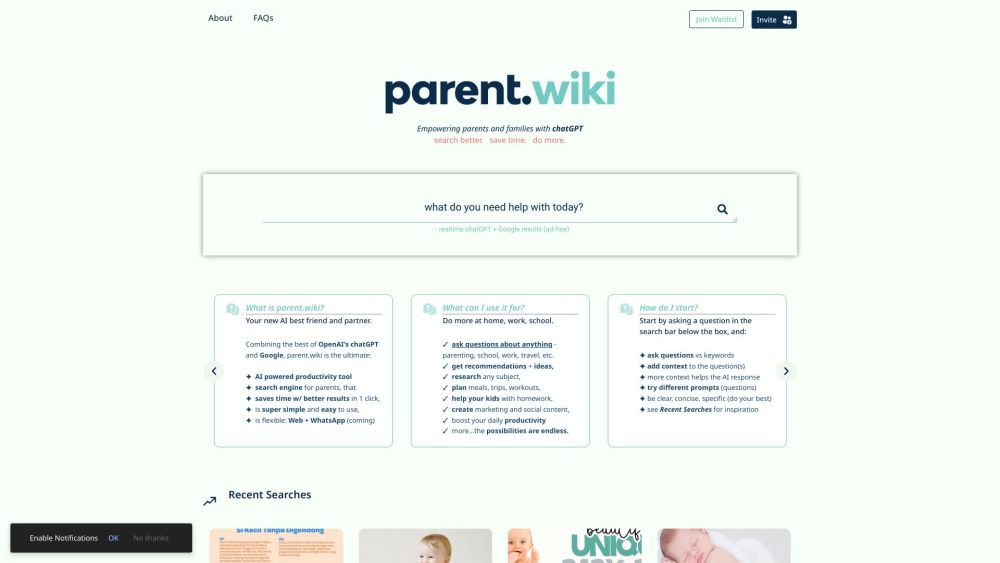
Parent.wiki website preview

Parent.wiki Website screenshot

Discover Parent.wiki

Parent.wiki is a specialized search engine created with parents in mind, utilizing the combined power of chatGPT and Google. It's designed to help parents find precise answers quickly, making their lives easier by offering curated results tailored to their needs.

Getting Started with Parent.wiki

Using Parent.wiki is straightforward: simply type your question or search term into the search bar. Whether you're looking for advice on parenting, tips for work-life balance, travel ideas, or more, Parent.wiki leverages chatGPT’s AI capabilities alongside Google’s search engine to deliver the best results. For optimal results, provide detailed context, and ensure your queries are clear and specific. You can also check the Recent Searches section for more ideas and inspiration.

Key Features of Parent.wiki

Real-time AI responses with chatGPT

Integrated search results from chatGPT and Google

User-friendly, intuitive interface

Accessible via web and soon on WhatsApp

Practical Uses of Parent.wiki

Generate creative ideas and suggestions

Conduct thorough research on any topic

Plan meals, vacations, and fitness routines

Assist kids with their homework

Craft marketing strategies and social media content

Enhance everyday productivity

And much more...

Product source: Parent.wiki official website. Check the provider for current plans, limits and availability.

FAQ

Parent.wiki questions and answers

Product context and practical checks for evaluating Parent.wiki.

What is Parent.wiki used for?

Parent.wiki: The curated search engine that saves parents time with tailored, enhanced search results. Find what matters most, faster!

How do I get started with Parent.wiki?

Using Parent.wiki is straightforward: simply type your question or search term into the search bar. Whether you're looking for advice on parenting, tips for work-life balance, travel ideas, or more, Parent.wiki leverages chatGPT’s AI capabilities alongside Google’s search engine to deliver the best results. For optimal results, provide detailed context, and ensure your queries are clear and specific. You can also check the Recent Searches section for more ideas and inspiration.

Which capabilities are described for Parent.wiki?

Real-time AI responses with chatGPTIntegrated search results from chatGPT and GoogleUser-friendly, intuitive interfaceAccessible via web and soon on WhatsApp

What should I compare before choosing a Parent.wiki plan?

Check Parent.wiki’s current pricing page for included usage, renewal terms and any credit charges. Compare the cost of a usable result, including retries, rather than assuming that account registration includes free usage.

What inputs should I prepare for a Parent.wiki trial?

Check supported documents, datasets and source access. Establish whether the product can inspect your actual material rather than answer from general knowledge.

How can I check the quality of a Parent.wiki result?

Follow citations to the original source, recalculate important numbers and check the date and scope of the evidence. Distinguish an explanation from a verified result.

Which export options should I check in Parent.wiki?

Look for usable citations, tables, downloadable data and reproducible steps. A clear answer should let another person inspect how the conclusion was reached.

What is a practical way to test Parent.wiki against alternatives?

Choose a question with known sources and a checkable result. Compare citation accuracy, omissions and reproducibility rather than response length.

What should I review before uploading material to Parent.wiki?

Read the provider’s rules on access, retention, deletion and use of uploaded material. Start with a non-confidential sample that you have permission to use.

Where is the official Parent.wiki website?

The website linked from this profile is https://Parent.wiki. Use the provider’s own documentation, account area and support channels to confirm current product details.

Visit Parent.wiki