AI Image Enhancer

ONEIMG

ONEIMG: Free AI Photo Editor to enhance, restore, and perfect your photos online. Instantly improve quality, remove backgrounds, and revive old memories!

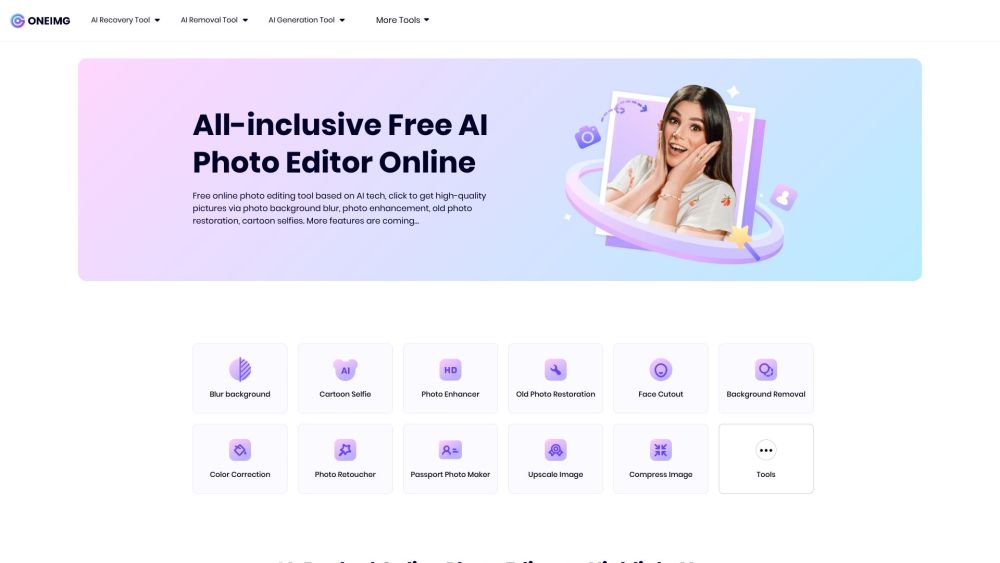
ONEIMG website preview

ONEIMG | Free AI Photo Editor & Online Photo Enhancement Tool Website screenshot

What is ONEIMG | Free AI Photo Editor & Online Photo Enhancement Tool?

ONEIMG is a powerful online photo editing tool that leverages advanced AI technology to effortlessly enhance, restore, and optimize your photos. Whether you're looking to refine an image, restore an old photo, or perform quick edits, ONEIMG provides a wide array of features, all accessible with just a single click.

How to use ONEIMG | Free AI Photo Editor & Online Photo Enhancement Tool?

Using ONEIMG is straightforward and convenient. Simply visit the platform on any device, upload your photo, and explore the various editing options available. Apply your desired changes, and once you're pleased with the result, download the enhanced image directly from the site.

ONEIMG | Free AI Photo Editor & Online Photo Enhancement Tool's Core Features

AI-Driven Photo Recovery

Background Blur

Image Enhancement

Vintage Photo Restoration

Photo Retouching

AI Object Removal

Background Removal

Face Cutout Tool

Color Correction

AI-Powered Image Generation

Cartoon Selfie Maker

Passport Photo Creator

ONEIMG | Free AI Photo Editor & Online Photo Enhancement Tool's Use Cases

One-Click Photo Enhancements

Restoring Old Photos to Their Original Quality

Creating Cartoon-Style Selfies

Generating Passport Photos

Removing Backgrounds from Images

Adding Face Cutouts to Photos

Correcting Photo Colors

  • ONEIMG | Free AI Photo Editor & Online Photo Enhancement Tool Support Email & Customer Service Contact

    For customer support, you can reach ONEIMG via their support email: [email protected]. For additional contact options, please visit the contact us page.

  • ONEIMG | Free AI Photo Editor & Online Photo Enhancement Tool Company Information

    Company Name: One Img.

    For more details, visit the about us page.

  • ONEIMG | Free AI Photo Editor & Online Photo Enhancement Tool Pricing

    For information on pricing, visit the pricing page.

Product source: ONEIMG official website. Check the provider for current plans, limits and availability.

FAQ

ONEIMG questions and answers

Product context and practical checks for evaluating ONEIMG.

What is ONEIMG used for?

ONEIMG: Free AI Photo Editor to enhance, restore, and perfect your photos online. Instantly improve quality, remove backgrounds, and revive old memories!

How do I get started with ONEIMG?

Using ONEIMG is straightforward and convenient. Simply visit the platform on any device, upload your photo, and explore the various editing options available. Apply your desired changes, and once you're pleased with the result, download the enhanced image directly from the site.

Which capabilities are described for ONEIMG?

AI-Driven Photo RecoveryBackground BlurImage EnhancementVintage Photo RestorationPhoto RetouchingAI Object RemovalBackground RemovalFace Cutout ToolColor CorrectionAI-Powered Image GenerationCartoon Selfie MakerPassport Photo Creator

What projects can I evaluate ONEIMG for?

One-Click Photo EnhancementsRestoring Old Photos to Their Original QualityCreating Cartoon-Style SelfiesGenerating Passport PhotosRemoving Backgrounds from ImagesAdding Face Cutouts to PhotosCorrecting Photo Colors ONEIMG | Free AI Photo Editor & Online Photo Enhancement Tool Support Email & Customer Service Contact For customer support, you can reach ONEIMG via their support email: [email protected]. For additional contact options, please visit the contact us page. ONEIMG | Free AI Photo Editor & Online Photo Enhancement Tool Company Information Company Name: One Img. For more details, visit the about us page. ONEIMG | Free AI Photo Editor & Online Photo Enhancement Tool Pricing For information on pricing, visit the pricing page.

What should I compare before choosing a ONEIMG plan?

For information on pricing, visit the pricing page. Confirm current prices and allowances on the provider’s website before purchasing.

What inputs should I prepare for a ONEIMG trial?

Look for text prompts, image references, masks or sketches as appropriate. Compare composition control, supported upload types and the ability to revise a selected area.

How can I check the quality of a ONEIMG result?

Inspect text, hands, edges, reflections and repeated objects at full size. Check that important product or brand details survive editing.

Which export options should I check in ONEIMG?

Compare pixel dimensions, transparency, file formats and any enlargement options. Confirm that the downloaded result works in your design or publishing software.

What is a practical way to test ONEIMG against alternatives?

Prepare a brief with a subject, composition, lighting and required output size. Test a first generation and a targeted revision to see how much control you retain.

Where is the official ONEIMG website?

The website linked from this profile is https://www.oneimg.online. Use the provider’s own documentation, account area and support channels to confirm current product details.

Visit ONEIMG