AI Analytics Assistant

NittyGritti - Chrome Extension

NittyGritti Chrome Extension: Automate PDP analysis for quality reviews, save time, and enhance product data accuracy with ease.

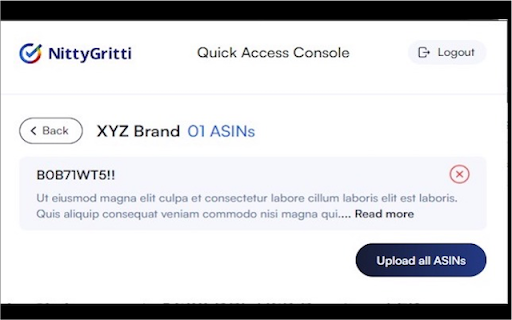
NittyGritti - Chrome Extension website preview

NittyGritti - Chrome Extension Website screenshot

What is NittyGritti - Chrome Extension?

NittyGritti is a Chrome extension designed to automate the analysis of Product Detail Pages (PDPs), focusing on every fine detail to deliver a comprehensive Content Quality Assessment Score. By leveraging advanced automation technology, it helps businesses review the quality of their content and improve the effectiveness of their product listings.

How to Use the NittyGritti Chrome Extension?

To start using NittyGritti, simply sign up on the platform, enter the link to the PDP you'd like to analyze, and receive an in-depth Content Quality Assessment Score within seconds. The extension simplifies the quality review process, enabling users to make data-driven improvements.

Key Features of NittyGritti - Chrome Extension

Automated PDP Analysis

Instantly scans every component of a product detail page, including images, descriptions, and specifications.

Content Quality Assessment Score

Generates a precise score that helps assess the overall quality of the content, allowing users to improve weak areas effectively.

NittyGritti's Use Cases

Optimizing Product Listings

Helps eCommerce businesses improve product listings, resulting in better customer engagement and higher conversion rates.

Boosting Content Marketing

Enhances content marketing strategies by ensuring that the quality of product descriptions and media is aligned with marketing goals.

Product source: NittyGritti - Chrome Extension official website. Check the provider for current plans, limits and availability.

FAQ

NittyGritti - Chrome Extension questions and answers

Product context and practical checks for evaluating NittyGritti - Chrome Extension.

What is NittyGritti - Chrome Extension used for?

NittyGritti Chrome Extension: Automate PDP analysis for quality reviews, save time, and enhance product data accuracy with ease.

How do I get started with NittyGritti - Chrome Extension?

To start using NittyGritti, simply sign up on the platform, enter the link to the PDP you'd like to analyze, and receive an in-depth Content Quality Assessment Score within seconds. The extension simplifies the quality review process, enabling users to make data-driven improvements.

Which capabilities are described for NittyGritti - Chrome Extension?

Automated PDP AnalysisInstantly scans every component of a product detail page, including images, descriptions, and specifications.Content Quality Assessment ScoreGenerates a precise score that helps assess the overall quality of the content, allowing users to improve weak areas effectively.

What projects can I evaluate NittyGritti - Chrome Extension for?

Optimizing Product ListingsHelps eCommerce businesses improve product listings, resulting in better customer engagement and higher conversion rates.Boosting Content MarketingEnhances content marketing strategies by ensuring that the quality of product descriptions and media is aligned with marketing goals.

What should I compare before choosing a NittyGritti - Chrome Extension plan?

Check NittyGritti - Chrome Extension’s current pricing page for included usage, renewal terms and any credit charges. Compare the cost of a usable result, including retries, rather than assuming that account registration includes free usage.

What inputs should I prepare for a NittyGritti - Chrome Extension trial?

Check supported documents, datasets and source access. Establish whether the product can inspect your actual material rather than answer from general knowledge.

How can I check the quality of a NittyGritti - Chrome Extension result?

Follow citations to the original source, recalculate important numbers and check the date and scope of the evidence. Distinguish an explanation from a verified result.

Which export options should I check in NittyGritti - Chrome Extension?

Look for usable citations, tables, downloadable data and reproducible steps. A clear answer should let another person inspect how the conclusion was reached.

What is a practical way to test NittyGritti - Chrome Extension against alternatives?

Choose a question with known sources and a checkable result. Compare citation accuracy, omissions and reproducibility rather than response length.

Where is the official NittyGritti - Chrome Extension website?

The website linked from this profile is https://chromewebstore.google.com/detail/nittygritti/dddfjbnlonemjpffigdaahfoiohmgdlk. Use the provider’s own documentation, account area and support channels to confirm current product details.

Visit NittyGritti - Chrome Extension