AI Grammar Checker

NeuroSpell

NeuroSpell: Deep Learning Auto-Corrector & Multilingual Translator. Corrects spelling, grammar, and translates across languages. On-premise, secure, and customizable.

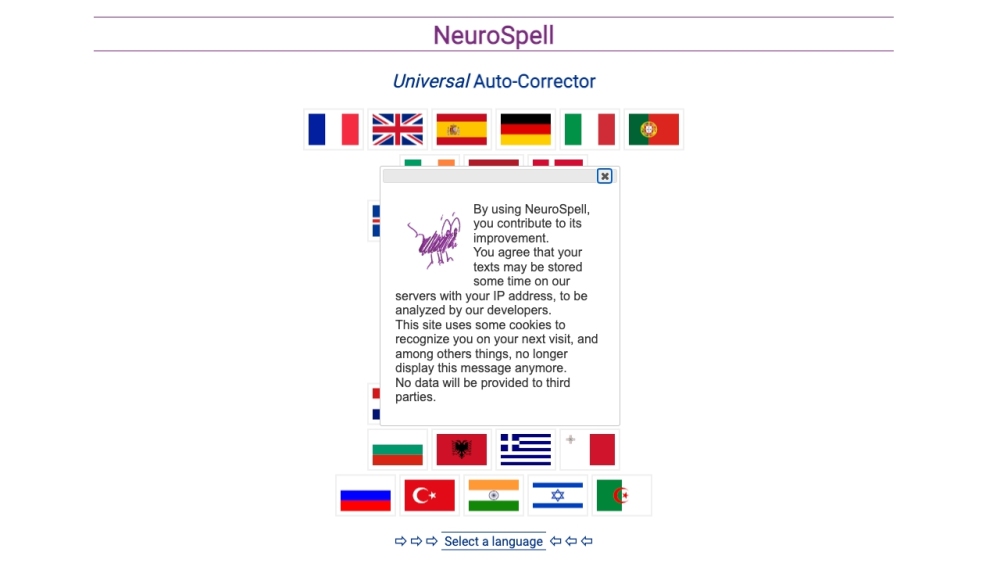
NeuroSpell website preview

NeuroSpell Website screenshot

What is NeuroSpell?

NeuroSpell is a sophisticated auto-correct and translation tool that leverages deep learning technology. It utilizes advanced neural networks to correct spelling and grammar mistakes across numerous languages automatically. Besides auto-correction, NeuroSpell functions as a powerful multilingual translator, enhancing text quality by refining spelling, grammar, and sentence structures. It can be tailored with domain-specific vocabularies and error patterns for precise corrections. Users can select from a broad spectrum of languages for both auto-correction and translation needs. NeuroSpell supports on-premise deployment, ensuring data security by not transmitting any information externally. Its features include typo correction, punctuation adjustment, complex flexion corrections, and identification of non-native errors.

How to use NeuroSpell?

To use NeuroSpell, follow these steps: 1. Choose your preferred language from the drop-down menu. 2. Enter or paste the text you wish to correct or translate. 3. NeuroSpell will automatically identify and rectify spelling and grammar issues. 4. For translation, NeuroSpell will provide the text in the selected language. 5. Users can report issues or get in touch with the development team via GitHub, Twitter, Discord, or LinkedIn.

NeuroSpell's Core Features

Neural Auto-Correction: Utilizes deep learning to automatically correct spelling, grammar, and sentence structures.

Language Support: Offers extensive language support, including French, English, Spanish, German, Italian, Portuguese, among others.

On-Premise Deployment: Allows deployment within intranets, keeping all data secure and local.

Domain-Specific Training: Can be customized with specific vocabularies and error patterns for specialized corrections.

Automatic Translation: Provides multilingual translations using neural machine translation (NMT).

Linguistic Support: Includes typo correction, punctuation correction, complex flexions correction, and detection of non-native errors.

NeuroSpell's Use Cases

Writing Aid: Assists writers in improving their text quality by correcting spelling, grammar, and sentence structures.

Proofreading: Aids in proofreading documents to remove spelling and grammar mistakes.

Customer-Workflow Inputs Enrichment: Enhances customer interactions by ensuring responses are accurate and error-free.

Speech-to-Text Enhancement: Increases the accuracy of speech-to-text transcriptions by correcting errors.

OCR Error Correction: Improves the quality of optical character recognition (OCR) results by identifying and correcting errors.

Product source: NeuroSpell official website. Check the provider for current plans, limits and availability.

FAQ

NeuroSpell questions and answers

Product context and practical checks for evaluating NeuroSpell.

What is NeuroSpell used for?

NeuroSpell: Deep Learning Auto-Corrector & Multilingual Translator. Corrects spelling, grammar, and translates across languages. On-premise, secure, and customizable.

How do I get started with NeuroSpell?

To use NeuroSpell, follow these steps: 1. Choose your preferred language from the drop-down menu. 2. Enter or paste the text you wish to correct or translate. 3. NeuroSpell will automatically identify and rectify spelling and grammar issues. 4. For translation, NeuroSpell will provide the text in the selected language. 5. Users can report issues or get in touch with the development team via GitHub, Twitter, Discord, or LinkedIn.

Which capabilities are described for NeuroSpell?

Neural Auto-Correction: Utilizes deep learning to automatically correct spelling, grammar, and sentence structures.Language Support: Offers extensive language support, including French, English, Spanish, German, Italian, Portuguese, among others.On-Premise Deployment: Allows deployment within intranets, keeping all data secure and local.Domain-Specific Training: Can be customized with specific vocabularies and error patterns for specialized corrections.Automatic Translation: Provides multilingual translations using neural machine translation (NMT).Linguistic Support: Includes typo correction, punctuation correction, complex flexions correction, and detection of non-native errors.

What projects can I evaluate NeuroSpell for?

Writing Aid: Assists writers in improving their text quality by correcting spelling, grammar, and sentence structures.Proofreading: Aids in proofreading documents to remove spelling and grammar mistakes.Customer-Workflow Inputs Enrichment: Enhances customer interactions by ensuring responses are accurate and error-free.Speech-to-Text Enhancement: Increases the accuracy of speech-to-text transcriptions by correcting errors.OCR Error Correction: Improves the quality of optical character recognition (OCR) results by identifying and correcting errors. NeuroSpell Discord Join the NeuroSpell community on Discord: https://discord.gg/4TMtc3gc39. For more Discord details, click here(/discord/4tmtc3gc39). NeuroSpell Support Email & Customer Service Contact & Refund Contact Contact NeuroSpell support for customer service at: [email protected] . NeuroSpell LinkedIn Connect with NeuroSpell on LinkedIn: https://www.linkedin.com/company/cubaix/NeuroSpell Twitter Follow NeuroSpell on Twitter: https://twitter.com/NeuroSpellONeuroSpell GitHub Explore NeuroSpell on GitHub: https://github.com/EtienneAb3d/NeuroSpell/

What should I compare before choosing a NeuroSpell plan?

Check NeuroSpell’s current pricing page for included usage, renewal terms and any credit charges. Compare the cost of a usable result, including retries, rather than assuming that account registration includes free usage.

What inputs should I prepare for a NeuroSpell trial?

Check supported documents, datasets and source access. Establish whether the product can inspect your actual material rather than answer from general knowledge.

How can I check the quality of a NeuroSpell result?

Follow citations to the original source, recalculate important numbers and check the date and scope of the evidence. Distinguish an explanation from a verified result.

Which export options should I check in NeuroSpell?

Look for usable citations, tables, downloadable data and reproducible steps. A clear answer should let another person inspect how the conclusion was reached.

What is a practical way to test NeuroSpell against alternatives?

Choose a question with known sources and a checkable result. Compare citation accuracy, omissions and reproducibility rather than response length.

Where is the official NeuroSpell website?

The website linked from this profile is https://neurospell.com. Use the provider’s own documentation, account area and support channels to confirm current product details.

Visit NeuroSpell