Table of contents
Neocal: AI Calendar, Natural Language Scheduling & Reminders
Neocal: The AI calendar that understands your natural language—schedule meetings, set reminders & manage time effortlessly. Hassle-free scheduling, reimagined.
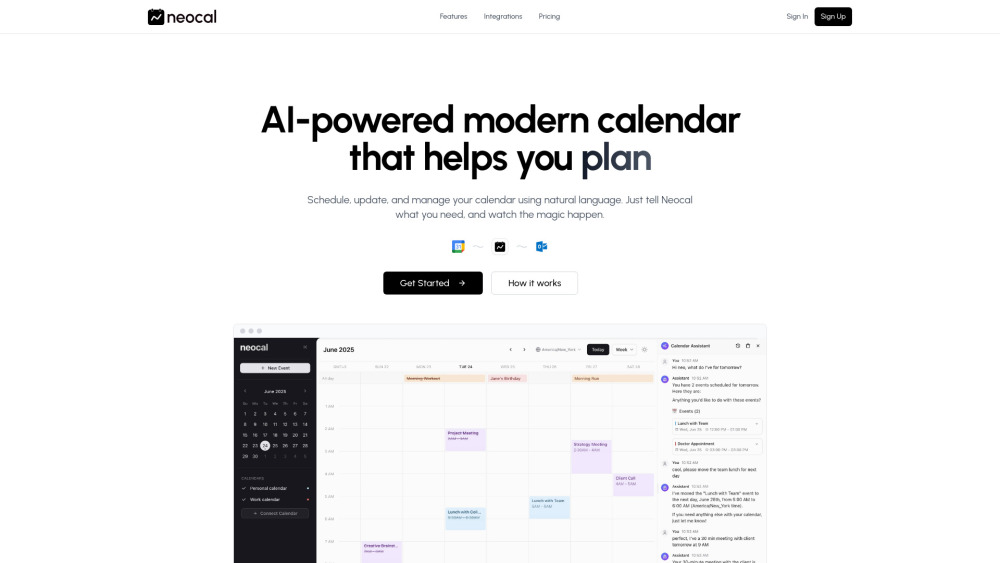
Introducing Neocal: Your AI Calendar, Powered by Language
Neocal reimagines time management—not as another calendar app, but as an intelligent scheduling partner. Built from the ground up with generative AI, Neocal understands natural language like a human assistant: you speak or type what you need, and it plans, adjusts, confirms, and syncs—effortlessly. Fully compatible with Google Calendar, it delivers real-time two-way sync across personal, work, and team calendars—no manual updates, no missed changes.
How Neocal Works—In Three Simple Steps
1. Connect: Link one or more Google Calendar accounts in seconds. 2. Command: Type or speak freely—e.g., “Reserve 45 minutes for Q3 strategy prep tomorrow afternoon” or “Cancel my 11 AM standup and notify the team.” 3. Confirm & Sync: Review Neocal’s context-aware suggestions—including conflict checks, attendee availability, and optimal time slots—then approve with one tap. Your calendar updates instantly everywhere.
Why Teams & Individuals Choose Neocal
Conversational Calendar Control
Conflict-Aware Smart Scheduling
Instant Schedule Insights (“What’s on my calendar this Friday?”)
Auto-Adapting Time Zone Logic (schedule across 12 time zones in one command)
One-Touch Event Actions (reschedule, duplicate, postpone, or delete)
Learning Context Engine (learns your rhythms—lunch breaks, focus hours, meeting preferences)
True Two-Way Google Calendar Sync (changes made in Neocal *or* Google Calendar reflect instantly)
Multi-Account Support (seamlessly manage work, family, freelance, and shared calendars)
Real-World Neocal Moments
“Book a 30-min sync with Alex and Maya next week” → Neocal finds overlapping free time, proposes slots, and sends invites.
“When’s my first meeting after vacation?” → Instant answer, with time zone-adjusted start time shown.
“Move my investor call to Thursday at 2 PM CET” → Automatically reschedules, updates attendees’ calendars, and adjusts reminders.
“Schedule weekly retrospectives every Monday at 9:30 AM” → Creates recurring event with smart defaults (duration, location, invitees).
“Find a 1-hour window this week when Priya, Dev, and I are all free” → Scans calendars, filters out buffers and focus time, returns best options.
“Set a reminder to follow up on the contract draft 2 days before deadline” → Turns intent into a timed, contextual alert—no manual date math.
Frequently Asked Questions
-
What is Neocal?
-
Which calendar services does Neocal support?
-
How does Neocal handle international scheduling?
-
Can I edit, move, or cancel events using voice or text?
-
Support & Contact
Have questions, feedback, or need help? Reach our support team directly at https://neocal.ai/contact.
-
About Neocal
Neocal is developed by Neocal, a team dedicated to building intuitive, ethical AI tools that restore time—and agency—to professionals. Learn our story, mission, and values: https://neocal.ai/about.
-
Log In to Neocal
Already onboarded? Sign in securely here: https://app.neocal.ai/login
-
Get Started with Neocal
Join thousands of teams simplifying scheduling—start your free trial today: https://app.neocal.ai/register
-
Follow Neocal
For product updates, tips, and AI scheduling insights: https://x.com/neocalAI
FAQ from Neocal
What is Neocal?
Neocal is an AI-native calendar platform that replaces clunky UIs with natural language interaction—turning scheduling, rescheduling, and reminders into quick, conversational tasks. It deeply integrates with Google Calendar to ensure accuracy, consistency, and zero sync lag.
Which calendar services does Neocal support?
Neocal currently offers full, secure, two-way integration with Google Calendar—including support for multiple accounts (e.g., personal Gmail + corporate GSuite). Future integrations (Outlook, iCloud) are in active development and will be announced via our official channels.
How does Neocal handle international scheduling?
Neocal detects participant time zones automatically, converts times intelligently, and surfaces conflicts *before* you confirm. Say “Schedule a call with Berlin and Singapore teams at their local 10 AM”—and Neocal calculates the optimal overlapping window, then books accordingly.
Can I edit, move, or cancel events using voice or text?
Absolutely. Neocal supports full lifecycle event management via natural language: create, reschedule, postpone, duplicate, update details (title, location, guests), add reminders, or cancel—with optional confirmation prompts for sensitive actions like deletion or mass edits.