Writing Assistants

MyVoice - Speech Assistant

MyVoice - Speech Assistant: Empower your voice with our text-to-speech tool designed for those with speech loss. Speak effortlessly again with MyVoice.

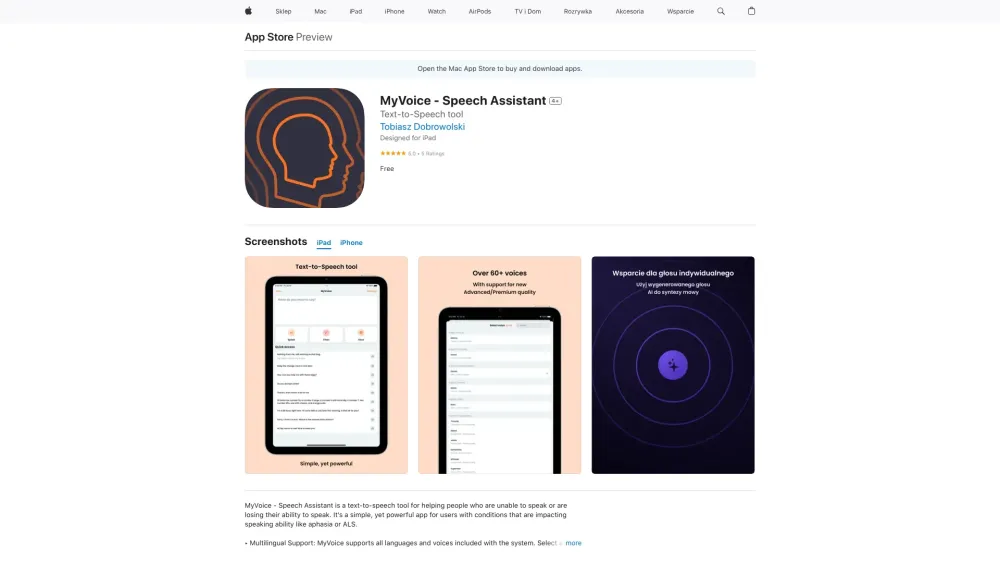
MyVoice - Speech Assistant website preview

MyVoice - Speech Assistant Website screenshot

Introducing MyVoice - Speech Assistant

MyVoice - Speech Assistant is an innovative text-to-speech application designed to aid individuals who have lost their ability to speak or are experiencing speech difficulties.

How to Operate MyVoice - Speech Assistant

Using MyVoice - Speech Assistant is straightforward: simply input the text you wish to vocalize and press the 'Speak' button.

Key Features of MyVoice - Speech Assistant

Multilingual Functionality

Support for multiple languages, making communication accessible globally.

High-Fidelity Voices

Delivers clear and natural-sounding voices for effective communication.

Personalized Voice Option

Create a custom voice profile that mimics your natural speaking voice.

User-Friendly Design

Intuitive interface that ensures ease of use for all age groups.

Quick-Phrase Functionality

Store frequently used phrases for rapid voice output.

Extensive Customization

Tailor the app’s settings to fit personal preferences and needs.

Practical Applications of MyVoice - Speech Assistant

For Individuals with Aphasia

Supports communication for those who have lost language abilities due to brain injury.

For ALS Patients

Provides a reliable communication tool for those affected by ALS.

For Speech-Impaired Users

Helps individuals with various speech impairments to communicate effectively.

Product source: MyVoice - Speech Assistant official website. Check the provider for current plans, limits and availability.

FAQ

MyVoice - Speech Assistant questions and answers

Product context and practical checks for evaluating MyVoice - Speech Assistant.

What is MyVoice - Speech Assistant used for?

MyVoice - Speech Assistant: Empower your voice with our text-to-speech tool designed for those with speech loss. Speak effortlessly again with MyVoice.

How do I get started with MyVoice - Speech Assistant?

Using MyVoice - Speech Assistant is straightforward: simply input the text you wish to vocalize and press the 'Speak' button.

Which capabilities are described for MyVoice - Speech Assistant?

Multilingual FunctionalitySupport for multiple languages, making communication accessible globally.High-Fidelity VoicesDelivers clear and natural-sounding voices for effective communication.Personalized Voice OptionCreate a custom voice profile that mimics your natural speaking voice.User-Friendly DesignIntuitive interface that ensures ease of use for all age groups.Quick-Phrase FunctionalityStore frequently used phrases for rapid voice output.Extensive CustomizationTailor the app’s settings to fit personal preferences and needs.

What projects can I evaluate MyVoice - Speech Assistant for?

For Individuals with AphasiaSupports communication for those who have lost language abilities due to brain injury.For ALS PatientsProvides a reliable communication tool for those affected by ALS.For Speech-Impaired UsersHelps individuals with various speech impairments to communicate effectively.

What should I compare before choosing a MyVoice - Speech Assistant plan?

Check MyVoice - Speech Assistant’s current pricing page for included usage, renewal terms and any credit charges. Compare the cost of a usable result, including retries, rather than assuming that account registration includes free usage.

What inputs should I prepare for a MyVoice - Speech Assistant trial?

Look for text prompts, image references, masks or sketches as appropriate. Compare composition control, supported upload types and the ability to revise a selected area.

How can I check the quality of a MyVoice - Speech Assistant result?

Inspect text, hands, edges, reflections and repeated objects at full size. Check that important product or brand details survive editing.

Which export options should I check in MyVoice - Speech Assistant?

Compare pixel dimensions, transparency, file formats and any enlargement options. Confirm that the downloaded result works in your design or publishing software.

What is a practical way to test MyVoice - Speech Assistant against alternatives?

Prepare a brief with a subject, composition, lighting and required output size. Test a first generation and a targeted revision to see how much control you retain.

Where is the official MyVoice - Speech Assistant website?

The website linked from this profile is https://apps.apple.com/pl/app/myvoice-asystent-mowy/id6450155201. Use the provider’s own documentation, account area and support channels to confirm current product details.

Visit MyVoice - Speech Assistant