General Writing

Master English Chrome Extension

Master English - Chrome Extension: Personalized learning for language skills. Take control of your language journey with tailored lessons and real-time feedback.

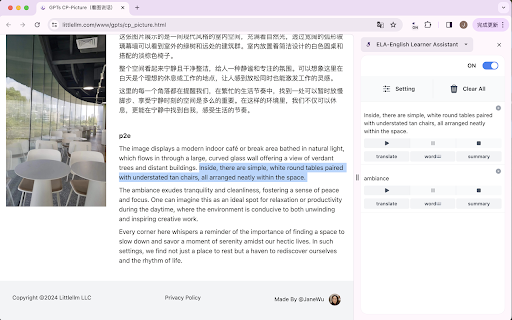
Master English Chrome Extension website preview

Master English - Chrome Extension Website screenshot

Master English Chrome Extension: Personalized Learning

Welcome to the Master English Chrome Extension, a powerful tool designed to enhance your language skills through personalized learning. Equipped with advanced TTS (Text-to-Speech) and LLM (Language Learning Model) technology, this extension provides a tailored learning experience like no other.

How to Get Started

To begin your language learning journey, simply sign up on our website and select your preferred language level. The extension will guide you through a diagnostic test, which helps customize your learning path based on your strengths and weaknesses.

Core Features

Advanced TTS Technology

Our extension utilizes state-of-the-art TTS technology, allowing you to listen to high-quality audio pronunciations of words, phrases, and sentences. This immersive experience helps improve your pronunciation and listening skills.

LLM Technology for Personalized Learning

With our advanced LLM technology, the extension adapts to your individual learning style and pace. It analyzes your progress, identifies areas that require more attention, and provides targeted exercises and lessons to help you overcome challenges and make steady progress.

Master English Chrome Extension: use cases

Enhancing Vocabulary Through Interactive Exercises

One of the key use cases of our Master English Chrome Extension is improving vocabulary. Engage in interactive exercises that test your comprehension and expand your word bank. From fill-in-the-blank exercises to word association games, you'll find a variety of engaging activities to boost your language skills.

Product source: Master English Chrome Extension official website. Check the provider for current plans, limits and availability.

FAQ

Master English Chrome Extension questions and answers

Product context and practical checks for evaluating Master English Chrome Extension.

What is Master English Chrome Extension used for?

Master English - Chrome Extension: Personalized learning for language skills. Take control of your language journey with tailored lessons and real-time feedback.

How do I get started with Master English Chrome Extension?

To begin your language learning journey, simply sign up on our website and select your preferred language level. The extension will guide you through a diagnostic test, which helps customize your learning path based on your strengths and weaknesses.

Which capabilities are described for Master English Chrome Extension?

Advanced TTS Technology Our extension utilizes state-of-the-art TTS technology, allowing you to listen to high-quality audio pronunciations of words, phrases, and sentences. This immersive experience helps improve your pronunciation and listening skills. LLM Technology for Personalized Learning With our advanced LLM technology, the extension adapts to your individual learning style and pace. It analyzes your progress, identifies areas that require more attention, and provides targeted exercises and lessons to help you overcome challenges and make steady progress.

What projects can I evaluate Master English Chrome Extension for?

Enhancing Vocabulary Through Interactive Exercises One of the key use cases of our Master English Chrome Extension is improving vocabulary. Engage in interactive exercises that test your comprehension and expand your word bank. From fill-in-the-blank exercises to word association games, you'll find a variety of engaging activities to boost your language skills.

What should I compare before choosing a Master English Chrome Extension plan?

Check Master English Chrome Extension’s current pricing page for included usage, renewal terms and any credit charges. Compare the cost of a usable result, including retries, rather than assuming that account registration includes free usage.

What inputs should I prepare for a Master English Chrome Extension trial?

Check supported documents, datasets and source access. Establish whether the product can inspect your actual material rather than answer from general knowledge.

How can I check the quality of a Master English Chrome Extension result?

Follow citations to the original source, recalculate important numbers and check the date and scope of the evidence. Distinguish an explanation from a verified result.

Which export options should I check in Master English Chrome Extension?

Look for usable citations, tables, downloadable data and reproducible steps. A clear answer should let another person inspect how the conclusion was reached.

What is a practical way to test Master English Chrome Extension against alternatives?

Choose a question with known sources and a checkable result. Compare citation accuracy, omissions and reproducibility rather than response length.

Where is the official Master English Chrome Extension website?

The website linked from this profile is https://chromewebstore.google.com/detail/ela-英文学习助手/eepeblbmpkloajddpjlibamomldfhdga. Use the provider’s own documentation, account area and support channels to confirm current product details.

Visit Master English Chrome Extension