AI Email Assistant

MailMentor - Chrome Extension

Boost engagement with personalized outreach using MailMentor, the Chrome Extension designed to craft compelling messages.

MailMentor - Chrome Extension website preview

MailMentor - Chrome Extension Website screenshot

Introducing MailMentor - Chrome Extension: Personalized Outreach for Increased Engagement: Personalized Messages

Are you looking for a sales copilot tool that can help you draft personalized outreach messages? Look no further than MailMentor - Chrome Extension. With its innovative features and intuitive interface, MailMentor revolutionizes the way you engage with prospects.

What is MailMentor - Chrome Extension?

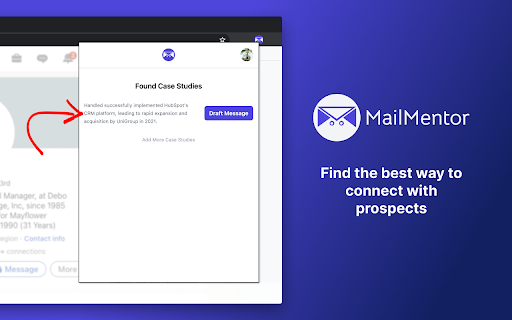
MailMentor - Chrome Extension is an exceptional tool that analyzes prospects' businesses and customers to create personalized outreach messages. By understanding their interests and needs, MailMentor helps you draft messages that truly resonate with your audience.

How does MailMentor - Chrome Extension work?

Installing MailMentor - Chrome Extension is the first step towards automating your outreach process. The extension integrates seamlessly with your browser, allowing you to draft personalized messages effortlessly. By leveraging the power of artificial intelligence, MailMentor analyzes your prospects' businesses and customers, enabling you to create tailored messages that drive engagement.

Key Features of MailMentor - Chrome Extension

Automated Drafting of Personalized Messages

Say goodbye to manual message drafting. MailMentor - Chrome Extension takes care of the process for you, saving you time and effort. With its intelligent algorithms, the extension generates personalized messages that capture your prospects' attention.

Deep Analysis of Prospects' Businesses

Understanding your prospects is crucial for effective outreach. MailMentor - Chrome Extension dives deep into their businesses, providing you with valuable insights that help you tailor your messages accordingly. By demonstrating your knowledge and understanding, you can establish a strong connection with your prospects.

Integration with Calendar for Personalization

Personalization is the key to successful outreach. MailMentor - Chrome Extension integrates seamlessly with your calendar, allowing you to incorporate your availability into your messages. By suggesting meeting times and demonstrating flexibility, you can create a more personal and engaging experience for your prospects.

Use Cases of MailMentor - Chrome Extension

Drafting Personalized Outreach Emails

With MailMentor - Chrome Extension, crafting personalized outreach emails has never been easier. The extension's advanced algorithms analyze your prospects' interests and needs, enabling you to create messages that resonate with them on a deeper level.

Increasing Response Rates with Tailored Messages

Generic messages often go unnoticed, but MailMentor - Chrome Extension helps you stand out from the crowd. By tailoring your messages to each prospect's specific requirements, you significantly increase the chances of receiving a positive response. Engage your audience like never before with MailMentor.

Product source: MailMentor - Chrome Extension official website. Check the provider for current plans, limits and availability.

FAQ

MailMentor - Chrome Extension questions and answers

Product context and practical checks for evaluating MailMentor - Chrome Extension.

What is MailMentor - Chrome Extension used for?

Boost engagement with personalized outreach using MailMentor, the Chrome Extension designed to craft compelling messages.

How do I get started with MailMentor - Chrome Extension?

Installing MailMentor - Chrome Extension is the first step towards automating your outreach process. The extension integrates seamlessly with your browser, allowing you to draft personalized messages effortlessly. By leveraging the power of artificial intelligence, MailMentor analyzes your prospects' businesses and customers, enabling you to create tailored messages that drive engagement.

Which capabilities are described for MailMentor - Chrome Extension?

Automated Drafting of Personalized MessagesSay goodbye to manual message drafting. MailMentor - Chrome Extension takes care of the process for you, saving you time and effort. With its intelligent algorithms, the extension generates personalized messages that capture your prospects' attention.Deep Analysis of Prospects' BusinessesUnderstanding your prospects is crucial for effective outreach. MailMentor - Chrome Extension dives deep into their businesses, providing you with valuable insights that help you tailor your messages accordingly. By demonstrating your knowledge and understanding, you can establish a strong connection with your prospects.Integration with Calendar for PersonalizationPersonalization is the key to successful outreach. MailMentor - Chrome Extension integrates seamlessly with your calendar, allowing you to incorporate your availability into your messages. By suggesting meeting times and demonstrating flexibility, you can create a more personal and engaging experience for your prospects.

What projects can I evaluate MailMentor - Chrome Extension for?

Drafting Personalized Outreach EmailsWith MailMentor - Chrome Extension, crafting personalized outreach emails has never been easier. The extension's advanced algorithms analyze your prospects' interests and needs, enabling you to create messages that resonate with them on a deeper level.Increasing Response Rates with Tailored MessagesGeneric messages often go unnoticed, but MailMentor - Chrome Extension helps you stand out from the crowd. By tailoring your messages to each prospect's specific requirements, you significantly increase the chances of receiving a positive response. Engage your audience like never before with MailMentor.

What should I compare before choosing a MailMentor - Chrome Extension plan?

Check MailMentor - Chrome Extension’s current pricing page for included usage, renewal terms and any credit charges. Compare the cost of a usable result, including retries, rather than assuming that account registration includes free usage.

What inputs should I prepare for a MailMentor - Chrome Extension trial?

Look for text prompts, image references, masks or sketches as appropriate. Compare composition control, supported upload types and the ability to revise a selected area.

How can I check the quality of a MailMentor - Chrome Extension result?

Inspect text, hands, edges, reflections and repeated objects at full size. Check that important product or brand details survive editing.

Which export options should I check in MailMentor - Chrome Extension?

Compare pixel dimensions, transparency, file formats and any enlargement options. Confirm that the downloaded result works in your design or publishing software.

What is a practical way to test MailMentor - Chrome Extension against alternatives?

Prepare a brief with a subject, composition, lighting and required output size. Test a first generation and a targeted revision to see how much control you retain.

Where is the official MailMentor - Chrome Extension website?

The website linked from this profile is https://chromewebstore.google.com/detail/mailmentor-sales-copilot/lmaejlipbkiphadkcbhmmpaoephkgmpj. Use the provider’s own documentation, account area and support channels to confirm current product details.

Visit MailMentor - Chrome Extension