AI Reply Assistant

MagicReply

Enhance your social media engagement with MagicReply - AI-powered replies for Twitter and LinkedIn. Boost your efficiency and connections instantly.

MagicReply website preview

MagicReply: AI-Powered Replies to Twitter & LinkedIn Posts
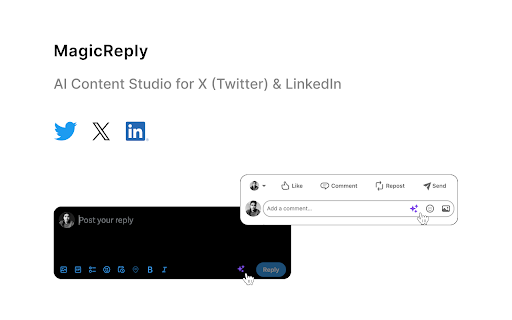
MagicReply - Chrome Extension Website screenshot

Introducing MagicReply AI Chrome Extension

Responding to social media posts on X (formerly known as Twitter) and LinkedIn has never been easier. With MagicReply AI Chrome Extension, you can now generate quick and intelligent replies using the power of artificial intelligence.

How to Use MagicReply AI Chrome Extension?

Getting started is simple. Visit our official website, magicreply.io, and purchase a subscription. Once subscribed, add the MagicReply Chrome extension to your browser. Then, simply paste the provided API key into the extension settings. Now, whenever you come across a tweet or LinkedIn post that requires a response, click 'Reply' and watch the magic unfold. Just press the star logo to generate a well-crafted reply in an instant.

Core Features of MagicReply AI Chrome Extension

AI-Generated Replies

Thanks to advanced AI algorithms, MagicReply generates intelligent responses that mimic human-like interaction. Say goodbye to time-consuming manual replies and let MagicReply handle it for you.

Fast Response to Social Media Posts

With MagicReply, you can swiftly respond to Twitter and LinkedIn posts without any delay. This ensures that you stay engaged with your audience and maintain an active online presence.

Use Cases of MagicReply AI Chrome Extension

Generate Thoughtful Responses on Twitter

Whether it's engaging with followers, replying to mentions, or participating in discussions, MagicReply helps you provide well-thought-out responses that resonate with your audience.

Quick Replies on LinkedIn Posts

When it comes to LinkedIn, MagicReply enables you to swiftly respond to posts, connect with professionals, and establish meaningful connections - all with minimal effort.

Product source: MagicReply official website. Check the provider for current plans, limits and availability.

FAQ

MagicReply questions and answers

Product context and practical checks for evaluating MagicReply.

What is MagicReply used for?

Enhance your social media engagement with MagicReply - AI-powered replies for Twitter and LinkedIn. Boost your efficiency and connections instantly.

How do I get started with MagicReply?

Getting started is simple. Visit our official website, magicreply.io, and purchase a subscription. Once subscribed, add the MagicReply Chrome extension to your browser. Then, simply paste the provided API key into the extension settings. Now, whenever you come across a tweet or LinkedIn post that requires a response, click 'Reply' and watch the magic unfold. Just press the star logo to generate a well-crafted reply in an instant.

Which capabilities are described for MagicReply?

AI-Generated RepliesThanks to advanced AI algorithms, MagicReply generates intelligent responses that mimic human-like interaction. Say goodbye to time-consuming manual replies and let MagicReply handle it for you.Fast Response to Social Media PostsWith MagicReply, you can swiftly respond to Twitter and LinkedIn posts without any delay. This ensures that you stay engaged with your audience and maintain an active online presence.

What projects can I evaluate MagicReply for?

Generate Thoughtful Responses on TwitterWhether it's engaging with followers, replying to mentions, or participating in discussions, MagicReply helps you provide well-thought-out responses that resonate with your audience.Quick Replies on LinkedIn PostsWhen it comes to LinkedIn, MagicReply enables you to swiftly respond to posts, connect with professionals, and establish meaningful connections - all with minimal effort.

What should I compare before choosing a MagicReply plan?

Check MagicReply’s current pricing page for included usage, renewal terms and any credit charges. Compare the cost of a usable result, including retries, rather than assuming that account registration includes free usage.

What inputs should I prepare for a MagicReply trial?

Identify the files, text or account connections your task needs. Confirm that the product accepts those inputs and offers controls for reviewing its work.

How can I check the quality of a MagicReply result?

Test one representative task and inspect the result for accuracy and completeness. Record where manual corrections or extra tools are needed.

Which export options should I check in MagicReply?

Check export formats, integrations and whether you can keep using your work outside the service. Test a real export before committing to a longer plan.

What is a practical way to test MagicReply against alternatives?

Choose one task with a clear success condition. Keep the input consistent, record the time spent reviewing and compare the complete workflow cost.

Where is the official MagicReply website?

The website linked from this profile is https://chromewebstore.google.com/detail/magicreply/pamhbelaneapiainlgkpamangfckdnac. Use the provider’s own documentation, account area and support channels to confirm current product details.

Visit MagicReply