AI Product Description Generator

Linguana

Linguana is a multi-language translation tool specifically designed for Framer and Webflow websites. It enables users to easily translate their website content into different languages, while maintaining an SEO-friendly structure and domain. With Linguana, you can reach a global audience and ensure a great user experience in their native language.

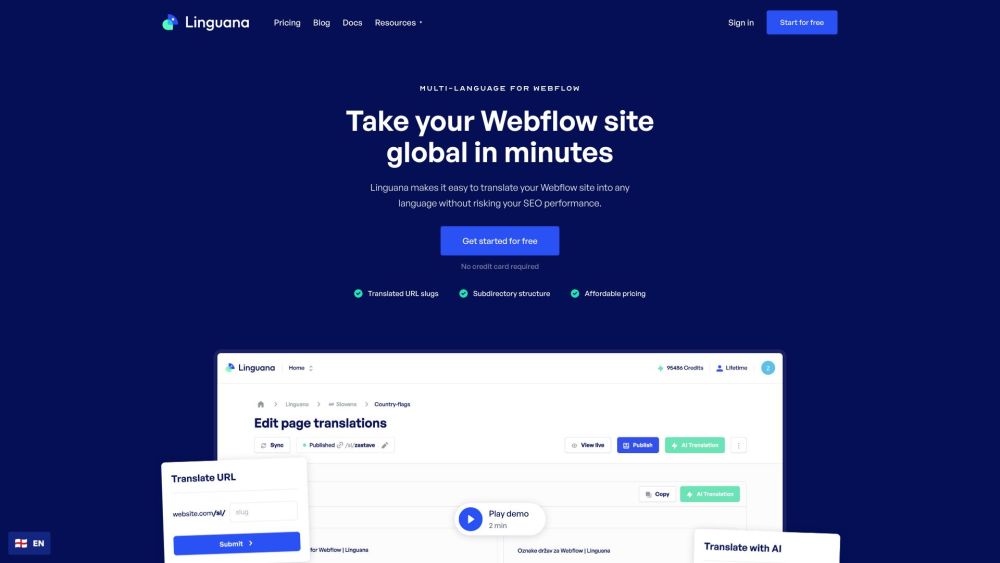
Linguana website preview

Linguana - Multi-language for Framer and Webflow Website screenshot

Introducing Linguana: Your Multi-Language Solution for Framer and Webflow

Linguana is a specialized tool designed to simplify the process of creating multilingual websites for Framer and Webflow platforms. It empowers you to effortlessly translate your site’s content into multiple languages while maintaining an optimized SEO framework. With Linguana, you can effectively broaden your online presence and provide users with an enhanced browsing experience in their preferred language.

Getting Started with Linguana for Framer and Webflow

Linguana makes setting up a multilingual website easy and straightforward. To begin, connect your Framer or Webflow site to Linguana and complete the simple onboarding steps. The tool’s intelligent parser will identify all the content on your website. You can then choose between manually translating your content or using Linguana’s AI-powered auto-translation feature. Once completed, your website will be available in multiple languages, ready to engage a global audience.

Key Features of Linguana for Framer and Webflow

SEO-Friendly Subdirectory or Custom Domain Setup: Select between subfolders or custom domains for optimized SEO performance.

Localized URL Slugs: Linguana allows you to translate your URL slugs, enhancing discoverability on search engines.

Manual or Automatic Translation Options: Choose to translate content yourself or utilize the AI auto-translation tool.

Dedicated for Framer: Linguana seamlessly integrates with Framer, helping you create a multilingual site with ease.

Optimized for Webflow: Convert your Webflow site into multiple languages without compromising on SEO best practices.

Competitive Pricing: Enjoy fair and affordable pricing plans that do not rely on word or page counts.

Use Cases for Linguana on Framer and Webflow Websites

Expand Your Global Reach: Offer your website content in several languages to attract a broader international audience.

Enhance User Experience: Allow visitors to view your site in their native language for an improved user experience.

Maintain SEO Integrity: Linguana supports SEO optimization with its structured subdirectory format and localized URL slugs.

Target International Markets: Translate your site to effectively engage with specific global markets and attract new customers.

Boost Traffic and Engagement: Offering content in various languages can increase website traffic and foster engagement from diverse user bases.

Product source: Linguana official website. Check the provider for current plans, limits and availability.

FAQ

Linguana questions and answers

Product context and practical checks for evaluating Linguana.

What is Linguana used for?

Linguana is a multi-language translation tool specifically designed for Framer and Webflow websites. It enables users to easily translate their website content into different languages, while maintaining an SEO-friendly structure and domain. With Linguana, you can reach a global audience and ensure a great user experience in their native language.

How do I get started with Linguana?

Linguana makes setting up a multilingual website easy and straightforward. To begin, connect your Framer or Webflow site to Linguana and complete the simple onboarding steps. The tool’s intelligent parser will identify all the content on your website. You can then choose between manually translating your content or using Linguana’s AI-powered auto-translation feature. Once completed, your website will be available in multiple languages, ready to engage a global audience.

Which capabilities are described for Linguana?

SEO-Friendly Subdirectory or Custom Domain Setup: Select between subfolders or custom domains for optimized SEO performance.Localized URL Slugs: Linguana allows you to translate your URL slugs, enhancing discoverability on search engines.Manual or Automatic Translation Options: Choose to translate content yourself or utilize the AI auto-translation tool.Dedicated for Framer: Linguana seamlessly integrates with Framer, helping you create a multilingual site with ease.Optimized for Webflow: Convert your Webflow site into multiple languages without compromising on SEO best practices.Competitive Pricing: Enjoy fair and affordable pricing plans that do not rely on word or page counts.

What projects can I evaluate Linguana for?

Expand Your Global Reach: Offer your website content in several languages to attract a broader international audience.Enhance User Experience: Allow visitors to view your site in their native language for an improved user experience.Maintain SEO Integrity: Linguana supports SEO optimization with its structured subdirectory format and localized URL slugs.Target International Markets: Translate your site to effectively engage with specific global markets and attract new customers.Boost Traffic and Engagement: Offering content in various languages can increase website traffic and foster engagement from diverse user bases. Linguana Company Overview Linguana is dedicated to providing a multilingual experience for websites built on Framer and Webflow. For more information, please visit our about us page. Linguana Login Log in to your Linguana account: https://app.linguana.io/sign-in Linguana Sign Up Create a new Linguana account: https://app.linguana.io/sign-up Linguana Pricing Details Discover our pricing plans: https://www.linguana.io/pricing

What should I compare before choosing a Linguana plan?

Discover our pricing plans: https://www.linguana.io/pricing Confirm current prices and allowances on the provider’s website before purchasing.

What inputs should I prepare for a Linguana trial?

Look for text prompts, image references, masks or sketches as appropriate. Compare composition control, supported upload types and the ability to revise a selected area.

How can I check the quality of a Linguana result?

Inspect text, hands, edges, reflections and repeated objects at full size. Check that important product or brand details survive editing.

Which export options should I check in Linguana?

Compare pixel dimensions, transparency, file formats and any enlargement options. Confirm that the downloaded result works in your design or publishing software.

What is a practical way to test Linguana against alternatives?

Prepare a brief with a subject, composition, lighting and required output size. Test a first generation and a targeted revision to see how much control you retain.

Where is the official Linguana website?

The website linked from this profile is https://www.linguana.io. Use the provider’s own documentation, account area and support channels to confirm current product details.

Visit Linguana