Writing Assistants

Kayako Agent Assistant Bot

Kayako Agent Assistant Bot: Boost your Kayako experience with AI-driven efficiency. A Chrome extension for smarter, faster customer support solutions.

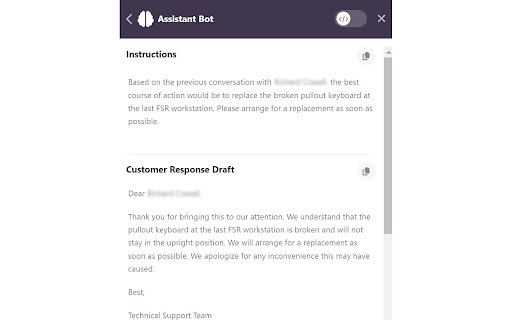
Kayako Agent Assistant Bot website preview

Kayako Agent Assistant Bot - Chrome Extension Website screenshot

What is the Kayako Agent Assistant Bot AI Chrome Extension?

Enhance your Kayako support system with the AI-powered Kayako Agent Assistant Bot. This Chrome extension is designed to optimize your ticket handling process, integrating effortlessly with your existing workflow to provide faster and more accurate responses. Empower your agents to focus on high-priority issues while the bot takes care of repetitive tasks.

How to Use the Kayako Agent Assistant Bot AI Chrome Extension?

Simply add the extension to your Chrome browser and link it to your Kayako account. Once integrated, it will automatically assist with ticket analysis, offer response suggestions, and provide context-based guidance to your agents, making it easier to manage support inquiries effectively.

Core Features of the Kayako Agent Assistant Bot AI Chrome Extension

Automated Ticket Analysis

Analyze incoming tickets and categorize them based on urgency and content, ensuring that no critical issue goes unnoticed.

Smart Response Suggestions

Generate tailored responses based on the ticket history and context, helping agents respond more quickly and accurately.

Guided Assistance

Provide step-by-step assistance and recommendations for resolving complex customer queries, improving resolution times.

Draft Responses

Create initial drafts of responses that agents can review and send, reducing the time spent on repetitive typing tasks.

Use Cases for the Kayako Agent Assistant Bot AI Chrome Extension

Streamlined Ticket Management

Handle large volumes of tickets efficiently, allowing agents to focus on more complex customer interactions.

Time-Saving Automation

Automate routine responses and ticket sorting, significantly reducing the time spent on low-value tasks.

Improved Training and Onboarding

Assist new agents with guided responses and suggestions, making the onboarding process smoother and more efficient.

Product source: Kayako Agent Assistant Bot official website. Check the provider for current plans, limits and availability.

FAQ

Kayako Agent Assistant Bot questions and answers

Product context and practical checks for evaluating Kayako Agent Assistant Bot.

What is Kayako Agent Assistant Bot used for?

Kayako Agent Assistant Bot: Boost your Kayako experience with AI-driven efficiency. A Chrome extension for smarter, faster customer support solutions.

How do I get started with Kayako Agent Assistant Bot?

Simply add the extension to your Chrome browser and link it to your Kayako account. Once integrated, it will automatically assist with ticket analysis, offer response suggestions, and provide context-based guidance to your agents, making it easier to manage support inquiries effectively.

Which capabilities are described for Kayako Agent Assistant Bot?

Automated Ticket AnalysisAnalyze incoming tickets and categorize them based on urgency and content, ensuring that no critical issue goes unnoticed.Smart Response SuggestionsGenerate tailored responses based on the ticket history and context, helping agents respond more quickly and accurately.Guided AssistanceProvide step-by-step assistance and recommendations for resolving complex customer queries, improving resolution times.Draft ResponsesCreate initial drafts of responses that agents can review and send, reducing the time spent on repetitive typing tasks.

What projects can I evaluate Kayako Agent Assistant Bot for?

Streamlined Ticket ManagementHandle large volumes of tickets efficiently, allowing agents to focus on more complex customer interactions.Time-Saving AutomationAutomate routine responses and ticket sorting, significantly reducing the time spent on low-value tasks.Improved Training and OnboardingAssist new agents with guided responses and suggestions, making the onboarding process smoother and more efficient.

What should I compare before choosing a Kayako Agent Assistant Bot plan?

Check Kayako Agent Assistant Bot’s current pricing page for included usage, renewal terms and any credit charges. Compare the cost of a usable result, including retries, rather than assuming that account registration includes free usage.

What inputs should I prepare for a Kayako Agent Assistant Bot trial?

Look for text prompts, image references, masks or sketches as appropriate. Compare composition control, supported upload types and the ability to revise a selected area.

How can I check the quality of a Kayako Agent Assistant Bot result?

Inspect text, hands, edges, reflections and repeated objects at full size. Check that important product or brand details survive editing.

Which export options should I check in Kayako Agent Assistant Bot?

Compare pixel dimensions, transparency, file formats and any enlargement options. Confirm that the downloaded result works in your design or publishing software.

What is a practical way to test Kayako Agent Assistant Bot against alternatives?

Prepare a brief with a subject, composition, lighting and required output size. Test a first generation and a targeted revision to see how much control you retain.

Where is the official Kayako Agent Assistant Bot website?

The website linked from this profile is https://chromewebstore.google.com/detail/kayako-bot/endocldhagkholcleefbmkoocejbfbbm. Use the provider’s own documentation, account area and support channels to confirm current product details.

Visit Kayako Agent Assistant Bot