Table of contents
IMGGen : AI Photo/Video Editor, Face Swap, BG Removal, Ghibli
IMGGen: Free AI image & video editor—enhance photos instantly, swap faces, remove backgrounds, restore old pics, apply Ghibli style. No signup needed!
Directory : Discover the best undefined tools reviews, pricing, features, use cases, alternatives. This category highlights emerging or niche AI navigation solutions that don’t yet fit standard classifications—innovative, experimental, or hybrid tools pushing the boundaries of wayfinding, spatial AI, and contextual guidance. Stay ahead with early insights.
What is IMGGen?
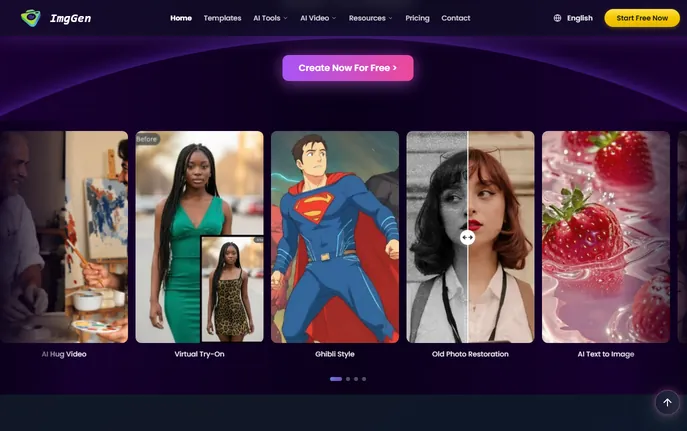
IMGGen is a next-generation, browser-native AI creative suite engineered for effortless photo and video transformation—no installation, no accounts, no expertise required. Built on state-of-the-art multimodal models, it empowers anyone to perform studio-grade edits in seconds: erase backgrounds with surgical precision, swap faces with photorealistic coherence, restore decades-old snapshots to vivid clarity, or reimagine everyday moments as enchanting Studio Ghibli masterpieces. More than just an editor, IMGGen is a unified creative engine—blending image enhancement, generative video, artistic stylization, and intelligent object manipulation into one intuitive, privacy-first interface. Recognized by AITop-Tools as a 2026 Top AI Creative Platform, it serves over 2.3 million creators—from indie filmmakers and e-commerce sellers to educators and grandparents—proving that professional creativity no longer demands complexity.
How to Use IMGGen
Using IMGGen is as simple as drag-and-drop. Open the editor in any modern browser, upload your photo or video, then choose your goal: remove a background, animate a portrait, apply Ghibli magic, or swap faces across images. Every tool activates instantly—no toggles, no layers, no timelines. Behind the scenes, proprietary AI models process your content in real time: edge-aware segmentation preserves flyaway hair and glass reflections; temporal coherence ensures natural motion in AI-generated videos; and semantic style transfer adapts Ghibli’s painterly textures, soft lighting, and emotive composition—not just filters, but faithful reinterpretation. No sign-up is needed to start editing, and all processing respects your workflow: batch-edit up to 20 assets at once, preview changes live before export, and download in high-res PNG, JPG, MP4, or WEBP—with transparent backgrounds preserved and metadata intact.
Go beyond basics with IMGGen’s generative layer: turn a single portrait into a cinematic 5-second clip with subtle parallax and ambient movement; transform a faded family photo into both a restored still *and* a gentle animated memory reel; or generate custom Ghibli-style avatars from selfies—complete with expressive eyes, hand-painted grain, and atmospheric depth. Whether you’re prepping Instagram carousels, designing Shopify banners, or digitizing heirloom albums, IMGGen compresses hours of manual work into a single, joyful interaction.
Key Features of IMGGen
- Intelligent Background Removal: Go beyond silhouettes—our adaptive segmentation understands context, distinguishing fine lace, pet fur, translucent smoke, or reflective surfaces. Output clean alpha-channel PNGs ideal for AR integrations, print-ready product mockups, and dynamic web visuals.
- Natural Face Swap Engine: Not just face replacement—but identity-aware synthesis. Maintains micro-expressions, gaze direction, shadow alignment, and skin texture continuity. Works seamlessly across ages, ethnicities, and lighting conditions—ideal for inclusive avatar creation, educational role-play media, and brand-safe influencer collabs.
- Ghibli Style Converter: The only AI tool trained exclusively on Studio Ghibli’s visual language—studying Miyazaki’s use of light diffusion, watercolor gradients, organic linework, and emotional framing. Converts photos into living illustrations where clouds drift, grass sways, and characters breathe—not static filters, but narrative reinterpretations.
- Vintage Photo Revival: Restores not just pixels—but meaning. Reconstructs missing corners, reconstructs faded sepia tones using archival color science, removes mold stains without blurring faces, and even intelligently extrapolates missing facial details from bilateral symmetry—turning fragile paper relics into vibrant digital heirlooms.
- Photo-to-Video AI Animator: Generates fluid, emotionally resonant motion—not looping GIFs. Adds gentle camera pans, subject breathing, eyelid flutter, and environmental ambiance (falling leaves, drifting clouds) based on scene semantics. Export as silent MP4 or add voiceover-ready audio tracks.
- Context-Aware Object Eraser: Removes logos, power lines, photobombers, or text—not by cloning, but by *understanding*. The AI analyzes surrounding textures, perspective, lighting, and material properties to regenerate seamless replacements—brick becomes brick, skin becomes skin, sky becomes sky.
Why Choose IMGGen?
In a landscape crowded with fragmented AI tools, IMGGen stands apart as a purpose-built *creative operating system*—not a collection of isolated features. While competitors charge per tool, restrict resolution, or watermark outputs, IMGGen delivers enterprise-caliber performance within its free tier: unlimited background removals, full-resolution Ghibli exports, watermark-free face swaps, and commercial-use rights—all accessible immediately, without login friction. Its architecture prioritizes ethical AI: zero data retention, opt-out training, and client-side preprocessing for sensitive edits. And unlike desktop apps that lock users into subscriptions, IMGGen evolves continuously—rolling out new artistic styles (e.g., Makoto Shinkai mode), video enhancement upgrades, and accessibility features like screen-reader-optimized editing flows—all included, no extra cost.
From solopreneurs building landing pages to global brands scaling UGC campaigns, IMGGen scales with intention—not overhead. Marketing teams integrate its API for automated product visualization; teachers generate illustrated storyboards from student drawings; genealogists rebuild ancestral timelines with animated portraits. It doesn’t replace creativity—it removes the friction between idea and execution, making every user a confident creator.
Use Cases and Applications
E-commerce Product Photography: Eliminate studio rental costs and post-production delays. Upload smartphone shots of products, remove backgrounds in one click, enhance lighting consistency across SKUs, and generate lifestyle mockups using AI-generated Ghibli-style environments—ideal for Etsy shops, DTC brands, and Amazon sellers needing standout visuals fast.
Social Media & Creator Economy: Stand out algorithmically with motion-rich content. Convert static blog headers into gentle Ghibli-inspired reels; animate profile pictures for LinkedIn intros; create face-swapped “day-in-the-life” skits for TikTok—without hiring animators or learning After Effects. The platform even suggests optimal aspect ratios and caption-friendly export presets.
Educational & Archival Projects:
Frequently Asked Questions About IMGGen
Is IMGGen completely free to use?
Yes—fully functional, no trial period, no credit card required. The free plan includes unlimited background removal, face swap, Ghibli conversion, object erasure, and photo restoration—up to 1080p resolution, with no watermarks or usage caps. Pro plans unlock 4K exports, priority GPU processing, bulk automation APIs, and advanced style variants (e.g., “Ghibli + Watercolor” or “Ghibli + Night Mode”).
What image and video formats does IMGGen support?
Upload: JPG, JPEG, PNG, WEBP, GIF, BMP, TIFF, and MP4 (up to 1 minute). Export: PNG (with transparency), JPG, WEBP, MP4 (H.264), and GIF. For video inputs, we auto-detect keyframes and optimize motion rendering—preserving original frame rate while enhancing detail.
How does IMGGen protect my photo privacy?
Your files never leave secure infrastructure. Images are processed in encrypted memory buffers and automatically purged from servers within 90 seconds of export—or immediately after session close. We do not store, index, train on, or share user uploads. All AI inference occurs via ephemeral compute instances with zero persistent storage. Full privacy policy and SOC 2 compliance documentation available on our Trust Center.
Can I use IMGGen for commercial projects?
Absolutely. All edited and generated content belongs solely to you. IMGGen grants perpetual, royalty-free, worldwide license to use outputs in marketing, merchandise, SaaS dashboards, client deliverables, and broadcast media. No attribution required—though we love being tagged! (Terms of Service include clear guidelines for trademarked/logos and biometric data handling.)
How realistic is the Ghibli Style Converter?
It’s not mimicry—it’s translation. Trained on annotated frames from 12 Studio Ghibli films and validated by animation historians, the model interprets depth, mood, and storytelling intent. A portrait becomes a character study with expressive eyes and soft bokeh; a cityscape transforms into a layered, hand-crafted diorama with wind-swept trees and atmospheric perspective. Realism comes from fidelity to *artistic intention*, not photorealism—and users consistently report higher emotional resonance in Ghibli-edited content versus generic anime filters.