AI Product Description Generator

HoneyDo

HoneyDo: Your voice-activated grocery list and AI photo ingredient finder. Simplify shopping with voice commands and 'Pic to Pick' feature for instant ingredient ID.

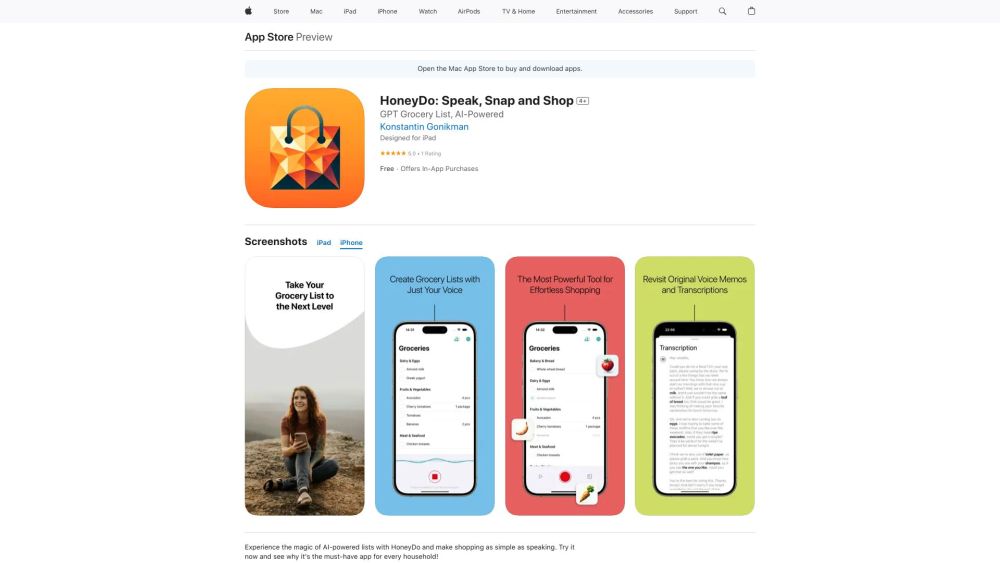
HoneyDo website preview

HoneyDo: Speak, Snap and Shop Website screenshot

Introducing HoneyDo: Voice Grocery List & AI Photo Ingredient Finder

HoneyDo revolutionizes the grocery shopping experience with its voice-activated list creation and AI-powered photo ingredient identification. Users can effortlessly compile shopping lists using voice commands or by snapping pictures of meals or pantry contents, which HoneyDo's advanced technology then analyzes to identify ingredients.

How to Use HoneyDo: Voice Grocery List & AI Photo Ingredient Finder

Using HoneyDo is simple: just speak your desired grocery items or take a photo of your pantry or meal. The app's AI will automatically catalog and organize the items for you. HoneyDo supports collaboration with shared lists and synchronization through iCloud, making grocery planning seamless. Additionally, the app offers easy list editing and supports multiple languages.

Key Features of HoneyDo: Voice Grocery List & AI Photo Ingredient Finder

Voice-activated list creation

AI-driven photo ingredient identification

Shared and synchronized lists

Natural language editing

Multilingual capabilities

Family sharing subscription

Ideal Uses for HoneyDo: Voice Grocery List & AI Photo Ingredient Finder

HoneyDo is perfect for individuals and families who need an efficient way to manage their grocery lists. It is especially useful for those who often forget items or need help organizing their shopping.

  • HoneyDo: Voice Grocery List & AI Photo Ingredient Finder Company

    HoneyDo is developed by Konstantin Gonikman.

  • HoneyDo: Voice Grocery List & AI Photo Ingredient Finder Pricing

    For pricing details, visit: HoneyDo Pricing

Product source: HoneyDo official website. Check the provider for current plans, limits and availability.

FAQ

HoneyDo questions and answers

Product context and practical checks for evaluating HoneyDo.

What is HoneyDo used for?

HoneyDo: Your voice-activated grocery list and AI photo ingredient finder. Simplify shopping with voice commands and 'Pic to Pick' feature for instant ingredient ID.

How do I get started with HoneyDo?

Using HoneyDo is simple: just speak your desired grocery items or take a photo of your pantry or meal. The app's AI will automatically catalog and organize the items for you. HoneyDo supports collaboration with shared lists and synchronization through iCloud, making grocery planning seamless. Additionally, the app offers easy list editing and supports multiple languages.

Which capabilities are described for HoneyDo?

Voice-activated list creationAI-driven photo ingredient identificationShared and synchronized listsNatural language editingMultilingual capabilitiesFamily sharing subscription

What should I compare before choosing a HoneyDo plan?

For pricing details, visit: HoneyDo Pricing Confirm current prices and allowances on the provider’s website before purchasing.

What inputs should I prepare for a HoneyDo trial?

Look for text prompts, image references, masks or sketches as appropriate. Compare composition control, supported upload types and the ability to revise a selected area.

How can I check the quality of a HoneyDo result?

Inspect text, hands, edges, reflections and repeated objects at full size. Check that important product or brand details survive editing.

Which export options should I check in HoneyDo?

Compare pixel dimensions, transparency, file formats and any enlargement options. Confirm that the downloaded result works in your design or publishing software.

What is a practical way to test HoneyDo against alternatives?

Prepare a brief with a subject, composition, lighting and required output size. Test a first generation and a targeted revision to see how much control you retain.

What should I review before uploading material to HoneyDo?

Read the provider’s rules on access, retention, deletion and use of uploaded material. Start with a non-confidential sample that you have permission to use.

Where is the official HoneyDo website?

The website linked from this profile is https://apps.apple.com/us/app/honeydo-speak-snap-and-shop/id6473463998?platform=iphone. Use the provider’s own documentation, account area and support channels to confirm current product details.

Visit HoneyDo