AI Response Generator

Graham.AI

Boost your tech game with Graham.AI! Created by Orel Biton and Ariel Verber, it crafts tweets like top tech influencers. Perfect for tech enthusiasts! 🚀 #AI #Tech

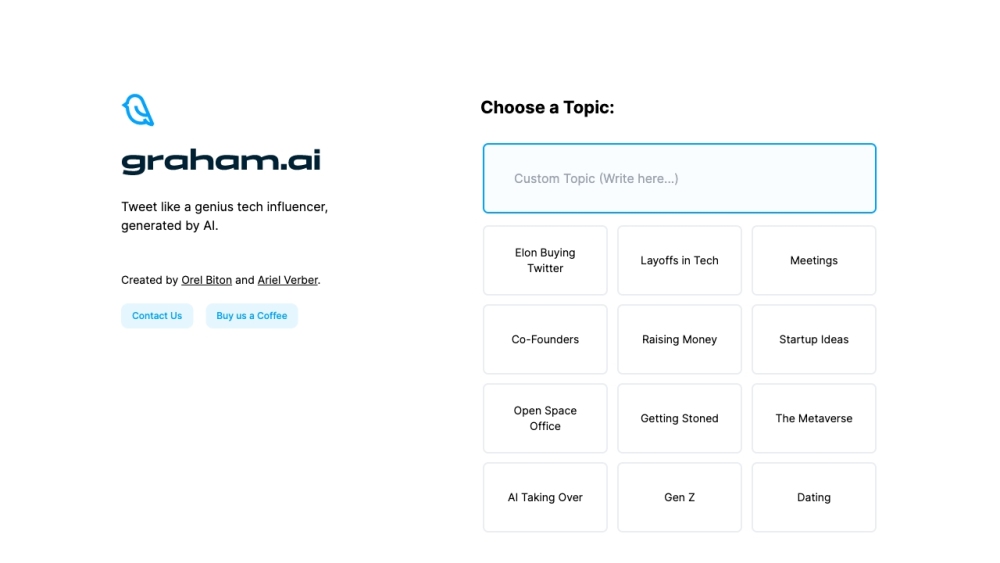
Graham.AI website preview

Graham.AI - Tech Tweet Generator Website screenshot

What is Graham.AI - AI Tech Tweet Generator?

Graham.AI is an innovative AI-powered tweet generator developed by Orel Biton and Ariel Verber. This tool is designed to craft tweets that emulate the styles of prominent tech influencers. Covering a wide range of topics including technology, startups, and artificial intelligence, it offers users the ability to generate influential and engaging tweets.

How to Use Graham.AI - AI Tech Tweet Generator?

Graham.AI is incredibly user-friendly. To get started, simply navigate to the website and select a topic from the available list, such as 'Elon Buying Twitter' or 'Startup Ideas.' After selecting a topic, click the 'Generate Tweet' button, and the AI will instantly produce a tweet for you. For additional tweets, just keep clicking the button.

Core Features of Graham.AI - AI Tech Tweet Generator

1. AI-generated tweets in the style of top tech influencers 2. Multiple topics to choose from 3. Instant tweet generation 4. Unlimited tweet generation 5. Easy-to-use interface

Use Cases for Graham.AI - AI Tech Tweet Generator

1. Enhance social media engagement: Share AI-generated tweets to captivate your audience. 2. Inspiration for tech influencers: Discover unique tweet ideas to boost your online presence. 3. Content creation: Utilize the generated tweets for blogs, articles, or presentations. 4. Trend analysis: Study generated tweets to understand trending topics and styles. 5. Entertainment: Enjoy exploring and sharing AI-generated tweets with your network.

Product source: Graham.AI official website. Check the provider for current plans, limits and availability.

FAQ

Graham.AI questions and answers

Product context and practical checks for evaluating Graham.AI.

What is Graham.AI used for?

Boost your tech game with Graham.AI! Created by Orel Biton and Ariel Verber, it crafts tweets like top tech influencers. Perfect for tech enthusiasts! 🚀 #AI #Tech

How do I get started with Graham.AI?

Graham.AI is incredibly user-friendly. To get started, simply navigate to the website and select a topic from the available list, such as 'Elon Buying Twitter' or 'Startup Ideas.' After selecting a topic, click the 'Generate Tweet' button, and the AI will instantly produce a tweet for you. For additional tweets, just keep clicking the button.

Which capabilities are described for Graham.AI?

1. AI-generated tweets in the style of top tech influencers 2. Multiple topics to choose from 3. Instant tweet generation 4. Unlimited tweet generation 5. Easy-to-use interface

What projects can I evaluate Graham.AI for?

1. Enhance social media engagement: Share AI-generated tweets to captivate your audience. 2. Inspiration for tech influencers: Discover unique tweet ideas to boost your online presence. 3. Content creation: Utilize the generated tweets for blogs, articles, or presentations. 4. Trend analysis: Study generated tweets to understand trending topics and styles. 5. Entertainment: Enjoy exploring and sharing AI-generated tweets with your network. Graham.AI - AI Tech Tweet Generator Support For customer support, contact us at: [email protected]. Graham.AI - AI Tech Tweet Generator LinkedIn Connect with us on LinkedIn: https://www.linkedin.com/in/orel-biton-94696514a/ Graham.AI - AI Tech Tweet Generator Twitter Follow us on Twitter: https://twitter.com/arielopie

What should I compare before choosing a Graham.AI plan?

Check Graham.AI’s current pricing page for included usage, renewal terms and any credit charges. Compare the cost of a usable result, including retries, rather than assuming that account registration includes free usage.

What inputs should I prepare for a Graham.AI trial?

Identify the files, text or account connections your task needs. Confirm that the product accepts those inputs and offers controls for reviewing its work.

How can I check the quality of a Graham.AI result?

Test one representative task and inspect the result for accuracy and completeness. Record where manual corrections or extra tools are needed.

Which export options should I check in Graham.AI?

Check export formats, integrations and whether you can keep using your work outside the service. Test a real export before committing to a longer plan.

What is a practical way to test Graham.AI against alternatives?

Choose one task with a clear success condition. Keep the input consistent, record the time spent reviewing and compare the complete workflow cost.

Where is the official Graham.AI website?

The website linked from this profile is https://makebestmusic.com. Use the provider’s own documentation, account area and support channels to confirm current product details.

Visit Graham.AI