AI Voice Chat Generator

Epicurus

Epicurus: AI-powered anonymous group chat fostering empathy & support through meaningful conversations with people who've shared similar experiences.

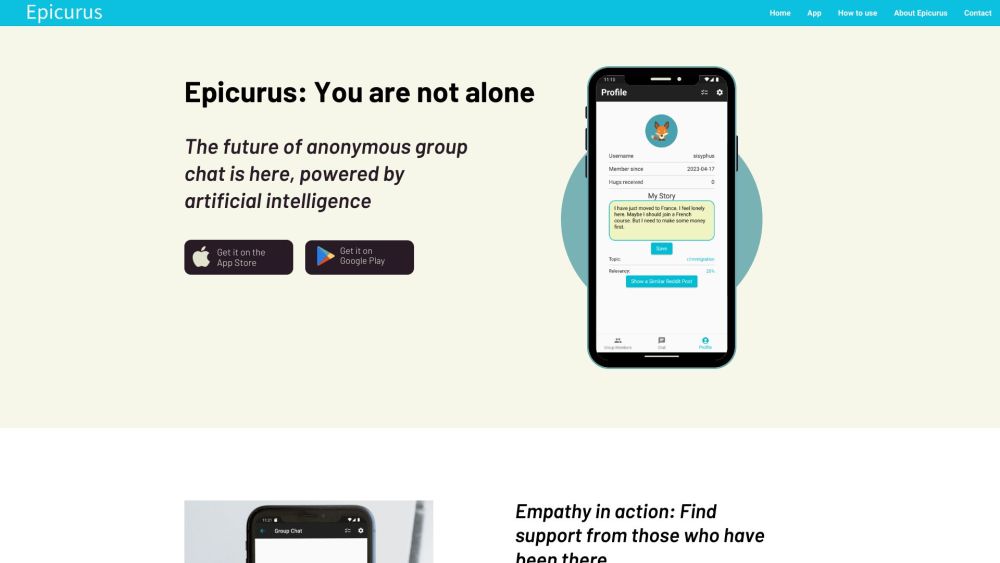
Epicurus website preview

Epicurus Website screenshot

What is Epicurus?

Epicurus is an innovative AI-driven anonymous group chat application designed to connect users with others who have faced similar life experiences. It emphasizes empathy, support, and engaging, meaningful conversations.

How to use Epicurus?

To get started with Epicurus, download the app from the App Store or Google Play. After installation, create your account and share your story and feelings in detail. The app uses this information to match you with other users who have had similar experiences, allowing you to begin chatting with a supportive community immediately.

Epicurus's Core Features

1. AI-Powered Matching: Epicurus leverages advanced AI to connect users based on their shared stories and experiences. 2. Anonymous Group Chats: Users can participate in conversations while preserving their anonymity. 3. Deep Connections: The app fosters significant, heartfelt discussions, encouraging empathy and support. 4. Community Support: Epicurus provides a platform for users to seek advice, receive support, and form new friendships during challenging times. 5. Notification System: Users are alerted when they receive new matches or messages.

Epicurus's Use Cases

1. Seeking Support: Users can find a community to share their experiences, express their emotions, and get advice from those who have faced similar challenges. 2. Making Friends: Epicurus helps users connect with like-minded individuals, fostering new friendships. 3. Meaningful Conversations: The app offers a space for deep and meaningful discussions on topics that matter. 4. Personal Growth and Healing: By promoting empathy and connection, Epicurus aids in personal growth and healing through shared stories and support.

Product source: Epicurus official website. Check the provider for current plans, limits and availability.

FAQ

Epicurus questions and answers

Product context and practical checks for evaluating Epicurus.

What is Epicurus used for?

Epicurus: AI-powered anonymous group chat fostering empathy & support through meaningful conversations with people who've shared similar experiences.

How do I get started with Epicurus?

To get started with Epicurus, download the app from the App Store or Google Play. After installation, create your account and share your story and feelings in detail. The app uses this information to match you with other users who have had similar experiences, allowing you to begin chatting with a supportive community immediately.

Which capabilities are described for Epicurus?

1. AI-Powered Matching: Epicurus leverages advanced AI to connect users based on their shared stories and experiences. 2. Anonymous Group Chats: Users can participate in conversations while preserving their anonymity. 3. Deep Connections: The app fosters significant, heartfelt discussions, encouraging empathy and support. 4. Community Support: Epicurus provides a platform for users to seek advice, receive support, and form new friendships during challenging times. 5. Notification System: Users are alerted when they receive new matches or messages.

What projects can I evaluate Epicurus for?

1. Seeking Support: Users can find a community to share their experiences, express their emotions, and get advice from those who have faced similar challenges. 2. Making Friends: Epicurus helps users connect with like-minded individuals, fostering new friendships. 3. Meaningful Conversations: The app offers a space for deep and meaningful discussions on topics that matter. 4. Personal Growth and Healing: By promoting empathy and connection, Epicurus aids in personal growth and healing through shared stories and support. Epicurus Support Email & Customer Service Contact & Refund Contact For more information, visit the contact us page (https://epicurusapp.com/support). Epicurus Company Learn more about Epicurus at the about us page (https://epicurusapp.com/#about-epicurus). Epicurus LinkedIn Follow us on LinkedIn: https://www.linkedin.com/company/90838537 Epicurus Twitter Follow us on Twitter: https://twitter.com/EpicurusApp Epicurus Instagram Follow us on Instagram: https://www.instagram.com/epicurusapp

What should I compare before choosing a Epicurus plan?

Check Epicurus’s current pricing page for included usage, renewal terms and any credit charges. Compare the cost of a usable result, including retries, rather than assuming that account registration includes free usage.

What inputs should I prepare for a Epicurus trial?

Identify the files, text or account connections your task needs. Confirm that the product accepts those inputs and offers controls for reviewing its work.

How can I check the quality of a Epicurus result?

Test one representative task and inspect the result for accuracy and completeness. Record where manual corrections or extra tools are needed.

Which export options should I check in Epicurus?

Check export formats, integrations and whether you can keep using your work outside the service. Test a real export before committing to a longer plan.

What is a practical way to test Epicurus against alternatives?

Choose one task with a clear success condition. Keep the input consistent, record the time spent reviewing and compare the complete workflow cost.

Where is the official Epicurus website?

The website linked from this profile is https://www.promptdodo.com. Use the provider’s own documentation, account area and support channels to confirm current product details.

Visit Epicurus