Other

Cyberint - Chrome Extension

Cyberint Chrome Extension: Strengthen your web security with real-time threat intelligence. Detect and prevent cyber threats with ease!

Cyberint - Chrome Extension website preview

Cyberint - Chrome Extension Website screenshot

What is Cyberint AI Chrome Extension?

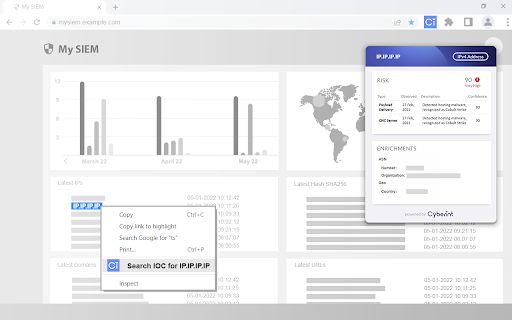
The Cyberint Chrome extension enhances your browsing security by embedding real-time threat intelligence into any webpage. It collects intelligence from hundreds of sources across the open, deep, and dark web to enrich indicators of compromise (IOCs) and common vulnerabilities and exposures (CVEs). With a single click, you can reveal risk scores, identify Command & Control (C2) servers, botnets, and infected machines on any site you visit. Seamlessly integrating with your existing cybersecurity infrastructure like SOC systems, SIEMs, and EDR platforms, Cyberint extends your ability to proactively manage your attack surface by providing visibility into external risks. Organizations gain early detection of threats and vulnerabilities by utilizing its autonomous asset discovery combined with comprehensive threat intelligence. Trusted by global companies, including many Fortune 500 enterprises, Cyberint helps you safeguard your organization against phishing, ransomware, fraud, and other forms of cyberattacks.

How to Use Cyberint AI Chrome Extension?

Using the Cyberint Chrome extension is simple. Once installed, it integrates effortlessly with your SOC, SIEM, or EDR systems to provide a seamless layer of protection. Just visit any website, and the extension will automatically assess potential risks by providing intelligence-based insights.

Cyberint AI Chrome Extension's Core Features

Intelligence-Driven Risk Scoring

Real-Time Detection of C2 Servers, Botnets, and Infected Systems

Autonomous Discovery of External-Facing Assets

Proven Protection for Fortune 500 Companies

Cyberint AI Chrome Extension's Use Cases

Prevent Phishing and Fraudulent Activities

Ransomware Detection and Investigation

Product source: Cyberint - Chrome Extension official website. Check the provider for current plans, limits and availability.

FAQ

Cyberint - Chrome Extension questions and answers

Product context and practical checks for evaluating Cyberint - Chrome Extension.

What is Cyberint - Chrome Extension used for?

Cyberint Chrome Extension: Strengthen your web security with real-time threat intelligence. Detect and prevent cyber threats with ease!

How do I get started with Cyberint - Chrome Extension?

Using the Cyberint Chrome extension is simple. Once installed, it integrates effortlessly with your SOC, SIEM, or EDR systems to provide a seamless layer of protection. Just visit any website, and the extension will automatically assess potential risks by providing intelligence-based insights.

Which capabilities are described for Cyberint - Chrome Extension?

Intelligence-Driven Risk ScoringReal-Time Detection of C2 Servers, Botnets, and Infected SystemsAutonomous Discovery of External-Facing AssetsProven Protection for Fortune 500 Companies

What projects can I evaluate Cyberint - Chrome Extension for?

Prevent Phishing and Fraudulent ActivitiesRansomware Detection and Investigation

What should I compare before choosing a Cyberint - Chrome Extension plan?

Check Cyberint - Chrome Extension’s current pricing page for included usage, renewal terms and any credit charges. Compare the cost of a usable result, including retries, rather than assuming that account registration includes free usage.

What inputs should I prepare for a Cyberint - Chrome Extension trial?

Identify the files, text or account connections your task needs. Confirm that the product accepts those inputs and offers controls for reviewing its work.

How can I check the quality of a Cyberint - Chrome Extension result?

Test one representative task and inspect the result for accuracy and completeness. Record where manual corrections or extra tools are needed.

Which export options should I check in Cyberint - Chrome Extension?

Check export formats, integrations and whether you can keep using your work outside the service. Test a real export before committing to a longer plan.

What is a practical way to test Cyberint - Chrome Extension against alternatives?

Choose one task with a clear success condition. Keep the input consistent, record the time spent reviewing and compare the complete workflow cost.

Where is the official Cyberint - Chrome Extension website?

The website linked from this profile is https://chromewebstore.google.com/detail/risk-intelligence-web-ext/nkiomlfnhcldoiogembgepanimfdafip. Use the provider’s own documentation, account area and support channels to confirm current product details.

Visit Cyberint - Chrome Extension