Other

ChatYY - Chrome Extension

ChatYY - Chrome Extension: Your AI assistant for all tasks. Boost productivity, get instant answers, and complete tasks fast and easy—right in your browser!

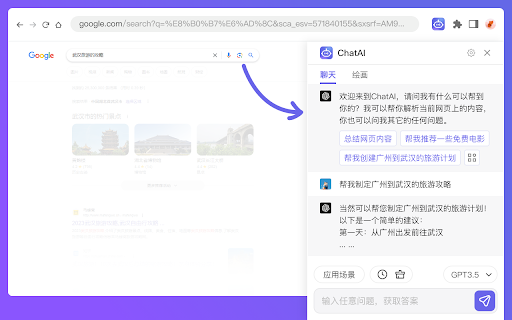
ChatYY - Chrome Extension website preview

ChatYY - Chrome Extension Website screenshot

Introducing ChatYY AI: Your All-in-One Chrome Extension for Every Task

ChatYY AI Assistant is a versatile Chrome extension designed to help you accomplish any task quickly and efficiently. From generating content to providing instant translations, ChatYY is your go-to tool for seamless browsing and productivity.

How to Get Started with ChatYY AI Chrome Extension

1. Activate ChatYY with a simple keyboard shortcut: press Cmd+M or Ctrl+M. 2. Highlight any text on a webpage to get instant translations or definitions. 3. Explore a wide range of pre-configured chat topics to spark ideas. 4. Summarize YouTube videos in seconds without watching them entirely.

Key Features of ChatYY AI Chrome Extension

Interactive Chat Box

Quick Search Assistant

Integrated Web Browsing

AI-Powered Copywriting for Ads and Blogs

Variety of Predefined Chat Topics

Instant YouTube Video Summarization

PDF Interaction Support

Real-Time Translations and Explanations

AI Art Creation Studio

No Login Required for Use

Compatible with Android and iOS Devices

Applications of ChatYY AI Chrome Extension

Engage in Interactive Conversations

Utilize AI for Enhanced Google and Bing Searches

Navigate the Web Seamlessly Within the Plugin

Create High-Quality Copy for Marketing and Content

Access Diverse Chat Topics for Idea Generation

Summarize YouTube Content Instantly

Interact with PDF Documents

Get Real-Time Translations and Definitions

Generate Stunning Artwork with AI Tools

Use Without an Account Login

Access ChatYY on Both Android and iOS Platforms

Product source: ChatYY - Chrome Extension official website. Check the provider for current plans, limits and availability.

FAQ

ChatYY - Chrome Extension questions and answers

Product context and practical checks for evaluating ChatYY - Chrome Extension.

What is ChatYY - Chrome Extension used for?

ChatYY - Chrome Extension: Your AI assistant for all tasks. Boost productivity, get instant answers, and complete tasks fast and easy—right in your browser!

How do I get started with ChatYY - Chrome Extension?

1. Activate ChatYY with a simple keyboard shortcut: press Cmd+M or Ctrl+M. 2. Highlight any text on a webpage to get instant translations or definitions. 3. Explore a wide range of pre-configured chat topics to spark ideas. 4. Summarize YouTube videos in seconds without watching them entirely.

Which capabilities are described for ChatYY - Chrome Extension?

Interactive Chat BoxQuick Search AssistantIntegrated Web BrowsingAI-Powered Copywriting for Ads and BlogsVariety of Predefined Chat TopicsInstant YouTube Video SummarizationPDF Interaction SupportReal-Time Translations and ExplanationsAI Art Creation StudioNo Login Required for UseCompatible with Android and iOS Devices

What projects can I evaluate ChatYY - Chrome Extension for?

Engage in Interactive ConversationsUtilize AI for Enhanced Google and Bing SearchesNavigate the Web Seamlessly Within the PluginCreate High-Quality Copy for Marketing and ContentAccess Diverse Chat Topics for Idea GenerationSummarize YouTube Content InstantlyInteract with PDF DocumentsGet Real-Time Translations and DefinitionsGenerate Stunning Artwork with AI ToolsUse Without an Account LoginAccess ChatYY on Both Android and iOS Platforms

What should I compare before choosing a ChatYY - Chrome Extension plan?

Check ChatYY - Chrome Extension’s current pricing page for included usage, renewal terms and any credit charges. Compare the cost of a usable result, including retries, rather than assuming that account registration includes free usage.

What inputs should I prepare for a ChatYY - Chrome Extension trial?

Identify the files, text or account connections your task needs. Confirm that the product accepts those inputs and offers controls for reviewing its work.

How can I check the quality of a ChatYY - Chrome Extension result?

Test one representative task and inspect the result for accuracy and completeness. Record where manual corrections or extra tools are needed.

Which export options should I check in ChatYY - Chrome Extension?

Check export formats, integrations and whether you can keep using your work outside the service. Test a real export before committing to a longer plan.

What is a practical way to test ChatYY - Chrome Extension against alternatives?

Choose one task with a clear success condition. Keep the input consistent, record the time spent reviewing and compare the complete workflow cost.

Where is the official ChatYY - Chrome Extension website?

The website linked from this profile is https://chromewebstore.google.com/detail/chatyy/ennmnfichkhmcecpnllkjklgmfdcenlc. Use the provider’s own documentation, account area and support channels to confirm current product details.

Visit ChatYY - Chrome Extension