AI Reply Assistant

ChatSuggest - Chrome Extension

ChatSuggest Chrome Extension: Auto-suggest ready-to-send messages across multiple chat platforms, boosting response speed and productivity in every conversation.

ChatSuggest - Chrome Extension website preview

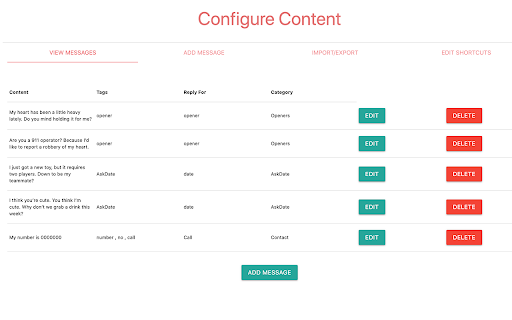
ChatSuggest - Chrome Extension Website screenshot

What is ChatSuggest - Chrome Extension?

ChatSuggest is a smart Chrome extension designed to provide automated message suggestions while chatting on platforms like Tinder, Bumble, WhatsApp, WeChat, and others. It enhances your communication by suggesting contextually appropriate responses in real-time.

How to use ChatSuggest - Chrome Extension?

Using ChatSuggest is simple! Just install the extension, link it to your preferred chat platforms, and let it assist you in generating instant message suggestions while you chat. The extension automatically integrates with supported platforms to provide helpful prompts as you type.

Core Features of ChatSuggest - Chrome Extension

Automated Message Suggestions

ChatSuggest saves time by offering ready-to-use, AI-driven message suggestions that match the conversation flow.

Compatible with Multiple Platforms

From Tinder to WhatsApp, ChatSuggest works across a variety of popular chat platforms to enhance your messaging experience.

Use Cases for ChatSuggest - Chrome Extension

Improve Conversations on Tinder

Whether you're looking to break the ice or keep the chat flowing, ChatSuggest offers tailored suggestions for meaningful interactions on Tinder.

Simplify Communication on Bumble

Struggling to come up with the right words? ChatSuggest offers a seamless chat experience with pre-written responses on Bumble, making communication smoother.

Product source: ChatSuggest - Chrome Extension official website. Check the provider for current plans, limits and availability.

FAQ

ChatSuggest - Chrome Extension questions and answers

Product context and practical checks for evaluating ChatSuggest - Chrome Extension.

What is ChatSuggest - Chrome Extension used for?

ChatSuggest Chrome Extension: Auto-suggest ready-to-send messages across multiple chat platforms, boosting response speed and productivity in every conversation.

How do I get started with ChatSuggest - Chrome Extension?

Using ChatSuggest is simple! Just install the extension, link it to your preferred chat platforms, and let it assist you in generating instant message suggestions while you chat. The extension automatically integrates with supported platforms to provide helpful prompts as you type.

Which capabilities are described for ChatSuggest - Chrome Extension?

Automated Message SuggestionsChatSuggest saves time by offering ready-to-use, AI-driven message suggestions that match the conversation flow.Compatible with Multiple PlatformsFrom Tinder to WhatsApp, ChatSuggest works across a variety of popular chat platforms to enhance your messaging experience.

What projects can I evaluate ChatSuggest - Chrome Extension for?

Improve Conversations on TinderWhether you're looking to break the ice or keep the chat flowing, ChatSuggest offers tailored suggestions for meaningful interactions on Tinder.Simplify Communication on BumbleStruggling to come up with the right words? ChatSuggest offers a seamless chat experience with pre-written responses on Bumble, making communication smoother.

What should I compare before choosing a ChatSuggest - Chrome Extension plan?

Check ChatSuggest - Chrome Extension’s current pricing page for included usage, renewal terms and any credit charges. Compare the cost of a usable result, including retries, rather than assuming that account registration includes free usage.

What inputs should I prepare for a ChatSuggest - Chrome Extension trial?

Identify the files, text or account connections your task needs. Confirm that the product accepts those inputs and offers controls for reviewing its work.

How can I check the quality of a ChatSuggest - Chrome Extension result?

Test one representative task and inspect the result for accuracy and completeness. Record where manual corrections or extra tools are needed.

Which export options should I check in ChatSuggest - Chrome Extension?

Check export formats, integrations and whether you can keep using your work outside the service. Test a real export before committing to a longer plan.

What is a practical way to test ChatSuggest - Chrome Extension against alternatives?

Choose one task with a clear success condition. Keep the input consistent, record the time spent reviewing and compare the complete workflow cost.

Where is the official ChatSuggest - Chrome Extension website?

The website linked from this profile is https://chromewebstore.google.com/detail/chatcat/oagmafjnibbdcpejjpjobfhnpiipknck. Use the provider’s own documentation, account area and support channels to confirm current product details.

Visit ChatSuggest - Chrome Extension