AI Chatbot

ChatGPT Voice - Chrome Extension

ChatGPT Voice - Chrome Extension: Elevate your ChatGPT experience with voice input and responses. Enjoy hands-free interaction with powerful voice features!

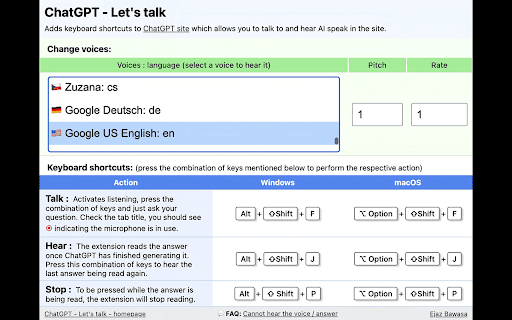
ChatGPT Voice - Chrome Extension website preview

ChatGPT Voice - Chrome Extension Website screenshot

What is ChatGPT Voice - Chrome Extension?

ChatGPT Voice is a Chrome extension designed to equip ChatGPT with advanced voice functionalities, transforming text-based interactions into dynamic voice conversations.

How to Set Up and Use ChatGPT Voice?

To get started with ChatGPT Voice, install the extension from the Chrome Web Store and activate it when using ChatGPT. Once enabled, users can access over 100 unique voices and customize both the pitch and speech rate for a personalized experience.

Key Features of ChatGPT Voice - Chrome Extension

Voice Functionality for ChatGPT

Customizable Voice Options

Over 100 Voice Selections

Adjustable Pitch and Speed Controls

Product source: ChatGPT Voice - Chrome Extension official website. Check the provider for current plans, limits and availability.

FAQ

ChatGPT Voice - Chrome Extension questions and answers

Product context and practical checks for evaluating ChatGPT Voice - Chrome Extension.

What is ChatGPT Voice - Chrome Extension used for?

ChatGPT Voice - Chrome Extension: Elevate your ChatGPT experience with voice input and responses. Enjoy hands-free interaction with powerful voice features!

How do I get started with ChatGPT Voice - Chrome Extension?

To get started with ChatGPT Voice, install the extension from the Chrome Web Store and activate it when using ChatGPT. Once enabled, users can access over 100 unique voices and customize both the pitch and speech rate for a personalized experience.

Which capabilities are described for ChatGPT Voice - Chrome Extension?

Voice Functionality for ChatGPTCustomizable Voice OptionsOver 100 Voice SelectionsAdjustable Pitch and Speed Controls

What should I compare before choosing a ChatGPT Voice - Chrome Extension plan?

Check ChatGPT Voice - Chrome Extension’s current pricing page for included usage, renewal terms and any credit charges. Compare the cost of a usable result, including retries, rather than assuming that account registration includes free usage.

What inputs should I prepare for a ChatGPT Voice - Chrome Extension trial?

Compare recording length, file types, language support and speaker handling. For voice generation, check pronunciation controls and permission to use any reference voice.

How can I check the quality of a ChatGPT Voice - Chrome Extension result?

Listen for mispronounced names, unnatural pauses, clipped words and noise. For transcripts, compare the text with the recording and correct speaker labels.

Which export options should I check in ChatGPT Voice - Chrome Extension?

Check audio format, sample rate, separate tracks, captions and timestamp exports. Confirm that the result works in your editing or accessibility workflow.

What is a practical way to test ChatGPT Voice - Chrome Extension against alternatives?

Use a short recording with names, numbers and more than one speaker, or a script with difficult pronunciation. Review the exported audio or transcript in full.

What should I review before uploading material to ChatGPT Voice - Chrome Extension?

Read the provider’s rules on access, retention, deletion and use of uploaded material. Start with a non-confidential sample that you have permission to use.

Where is the official ChatGPT Voice - Chrome Extension website?

The website linked from this profile is https://chrome.google.com/webstore/detail/chatgpt-lets-talk/ldkeljfcpadfpkfdloofmhamhkgdcpbo. Use the provider’s own documentation, account area and support channels to confirm current product details.

Visit ChatGPT Voice - Chrome Extension