Other

ChatGPT Extension

ChatGPT Extension - Chrome: Interact securely with ChatGPT directly in your browser. Boost productivity, streamline tasks, and enjoy private online conversations.

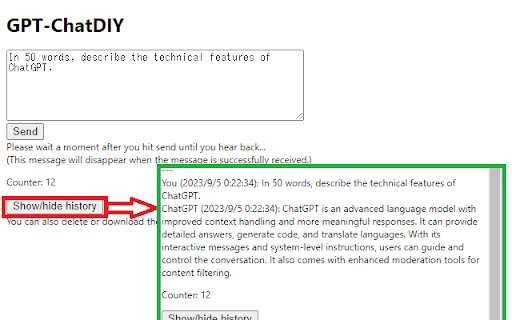
ChatGPT Extension website preview

ChatGPT Extension - Chrome Extension Website screenshot

What is ChatGPT Extension: Chrome Extension?

The ChatGPT Chrome Extension enables secure interaction with ChatGPT via user-generated API keys. It offers essential features such as conversation history management, the ability to download interactions, and provides tools for tracking usage costs. In addition, it includes data validation mechanisms to ensure that personal information is not accidentally shared.

How to Use ChatGPT Extension: Chrome Extension?

With this extension, users can leverage their own API keys to access ChatGPT, track previous conversations, export dialogue data, and estimate costs associated with API usage. Data validation features ensure that any sensitive or personal information remains protected during usage.

Core Features of ChatGPT Extension: Chrome Extension

Conversation History Management

Keep track of previous interactions through an integrated history tracking tool.

Downloadable Transcripts

Export conversations in a downloadable format for future reference or offline access.

API Cost Estimation

Provides users with an estimate of costs incurred while using ChatGPT through their self-issued API keys.

Multilingual Support

The extension supports multiple languages, enabling users from different regions to communicate with ChatGPT seamlessly.

Data Validation

Automatic validation of submitted data to prevent accidental leaks of personal or sensitive information.

Use Cases for ChatGPT Extension: Chrome Extension

Secure ChatGPT Interaction

Safely engage with ChatGPT while ensuring your data remains protected.

Conversation History Control

Easily manage and revisit your previous interactions for improved continuity.

Efficient Cost Management

Track and estimate the costs associated with using ChatGPT through the API.

Product source: ChatGPT Extension official website. Check the provider for current plans, limits and availability.

FAQ

ChatGPT Extension questions and answers

Product context and practical checks for evaluating ChatGPT Extension.

What is ChatGPT Extension used for?

ChatGPT Extension - Chrome: Interact securely with ChatGPT directly in your browser. Boost productivity, streamline tasks, and enjoy private online conversations.

How do I get started with ChatGPT Extension?

With this extension, users can leverage their own API keys to access ChatGPT, track previous conversations, export dialogue data, and estimate costs associated with API usage. Data validation features ensure that any sensitive or personal information remains protected during usage.

Which capabilities are described for ChatGPT Extension?

Conversation History ManagementKeep track of previous interactions through an integrated history tracking tool.Downloadable TranscriptsExport conversations in a downloadable format for future reference or offline access.API Cost EstimationProvides users with an estimate of costs incurred while using ChatGPT through their self-issued API keys.Multilingual SupportThe extension supports multiple languages, enabling users from different regions to communicate with ChatGPT seamlessly.Data ValidationAutomatic validation of submitted data to prevent accidental leaks of personal or sensitive information.

What projects can I evaluate ChatGPT Extension for?

Secure ChatGPT InteractionSafely engage with ChatGPT while ensuring your data remains protected.Conversation History ControlEasily manage and revisit your previous interactions for improved continuity.Efficient Cost ManagementTrack and estimate the costs associated with using ChatGPT through the API.

What should I compare before choosing a ChatGPT Extension plan?

Check ChatGPT Extension’s current pricing page for included usage, renewal terms and any credit charges. Compare the cost of a usable result, including retries, rather than assuming that account registration includes free usage.

What inputs should I prepare for a ChatGPT Extension trial?

Identify the files, text or account connections your task needs. Confirm that the product accepts those inputs and offers controls for reviewing its work.

How can I check the quality of a ChatGPT Extension result?

Test one representative task and inspect the result for accuracy and completeness. Record where manual corrections or extra tools are needed.

Which export options should I check in ChatGPT Extension?

Check export formats, integrations and whether you can keep using your work outside the service. Test a real export before committing to a longer plan.

What is a practical way to test ChatGPT Extension against alternatives?

Choose one task with a clear success condition. Keep the input consistent, record the time spent reviewing and compare the complete workflow cost.

Where is the official ChatGPT Extension website?

The website linked from this profile is https://chromewebstore.google.com/detail/gpt-chatdiy/mcmjgbljfnglbjpfiljmhobnnpohdjcb. Use the provider’s own documentation, account area and support channels to confirm current product details.

Visit ChatGPT Extension