AI Advertising Assistant

Beamcast

Beamcast: Access ChatGPT on any site. Write smarter, code faster, and get instant answers with this powerful browser extension. See pricing, reviews, and features.

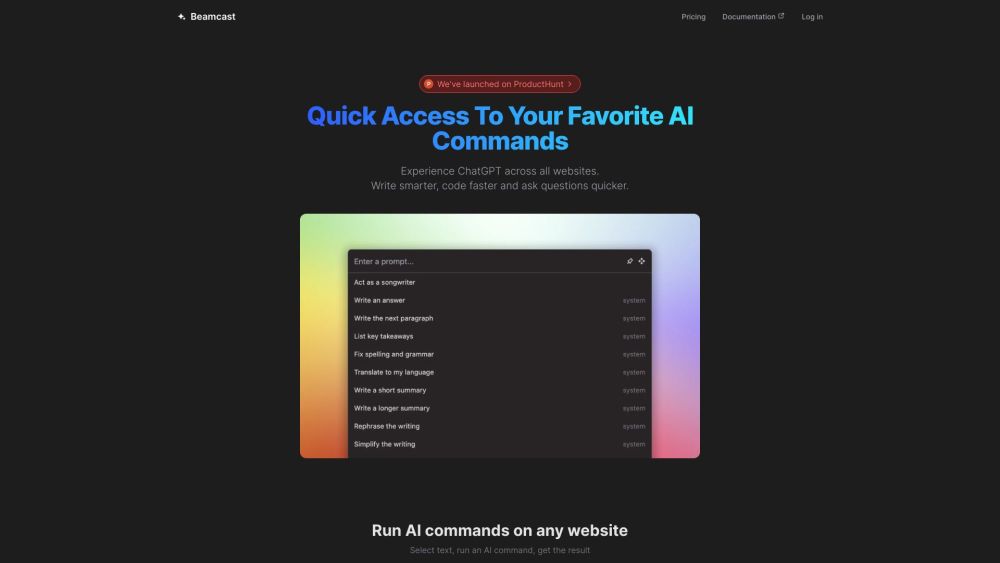
Beamcast website preview

Beamcast Website screenshot

What is Beamcast?

Beamcast is an innovative browser extension that integrates ChatGPT, a robust AI assistant, seamlessly into your web browsing experience. By leveraging Beamcast, you can enhance your writing, speed up coding tasks, and receive rapid answers to your queries, all through AI commands executed directly on any website.

How to use Beamcast?

To get started with Beamcast, download and install the extension on your browser. Once installed, highlight any text on a webpage, execute an AI command, and see instant results. Beamcast includes a variety of pre-configured commands to boost productivity, and it also supports custom prompts for tailored AI interactions. Your commands are securely stored in the cloud, ensuring they are synced across all browsers where Beamcast is installed.

Beamcast's Core Features

Execute AI commands on any website

Pre-built commands to enhance efficiency

Secure cloud storage and synchronization

Support for custom AI prompts

Powered by advanced AI models from OpenAI

Beamcast's Use Cases

Boost writing and content generation

Improve coding and development processes

Obtain quick answers to browsing queries

Access AI capabilities on any website

  • Beamcast Support Email & Customer Service Contact

    For customer service, please contact Beamcast support at [email protected].

  • Beamcast Company

    The developer of Beamcast is Umida Inc.

  • Beamcast Login

    To access your Beamcast account, visit the login page: https://beamcast.app/login

  • Beamcast Pricing

    For pricing details, please visit: https://beamcast.app/#pricing

  • Beamcast Twitter

    Follow Beamcast on Twitter for updates: https://twitter.com/localhost_5173

Product source: Beamcast official website. Check the provider for current plans, limits and availability.

FAQ

Beamcast questions and answers

Product context and practical checks for evaluating Beamcast.

What is Beamcast used for?

Beamcast: Access ChatGPT on any site. Write smarter, code faster, and get instant answers with this powerful browser extension. See pricing, reviews, and features.

How do I get started with Beamcast?

To get started with Beamcast, download and install the extension on your browser. Once installed, highlight any text on a webpage, execute an AI command, and see instant results. Beamcast includes a variety of pre-configured commands to boost productivity, and it also supports custom prompts for tailored AI interactions. Your commands are securely stored in the cloud, ensuring they are synced across all browsers where Beamcast is installed.

Which capabilities are described for Beamcast?

Execute AI commands on any websitePre-built commands to enhance efficiencySecure cloud storage and synchronizationSupport for custom AI promptsPowered by advanced AI models from OpenAI

What projects can I evaluate Beamcast for?

Boost writing and content generationImprove coding and development processesObtain quick answers to browsing queriesAccess AI capabilities on any website Beamcast Support Email & Customer Service Contact For customer service, please contact Beamcast support at [email protected]. Beamcast Company The developer of Beamcast is Umida Inc. Beamcast Login To access your Beamcast account, visit the login page: https://beamcast.app/login Beamcast Pricing For pricing details, please visit: https://beamcast.app/#pricing Beamcast Twitter Follow Beamcast on Twitter for updates: https://twitter.com/localhost_5173

What should I compare before choosing a Beamcast plan?

For pricing details, please visit: https://beamcast.app/#pricing Confirm current prices and allowances on the provider’s website before purchasing.

What inputs should I prepare for a Beamcast trial?

Look for text prompts, image references, masks or sketches as appropriate. Compare composition control, supported upload types and the ability to revise a selected area.

How can I check the quality of a Beamcast result?

Inspect text, hands, edges, reflections and repeated objects at full size. Check that important product or brand details survive editing.

Which export options should I check in Beamcast?

Compare pixel dimensions, transparency, file formats and any enlargement options. Confirm that the downloaded result works in your design or publishing software.

What is a practical way to test Beamcast against alternatives?

Prepare a brief with a subject, composition, lighting and required output size. Test a first generation and a targeted revision to see how much control you retain.

Where is the official Beamcast website?

The website linked from this profile is https://beamcast.app. Use the provider’s own documentation, account area and support channels to confirm current product details.

Visit Beamcast