AI Developer Tools

Avaturn

Avaturn is a realistic 3D avatar creator that allows users to create lifelike avatars using just a selfie. It offers customizable options for the avatar's appearance and allows users to export the avatar as a 3D model for use in various environments like games, apps, or the metaverse.

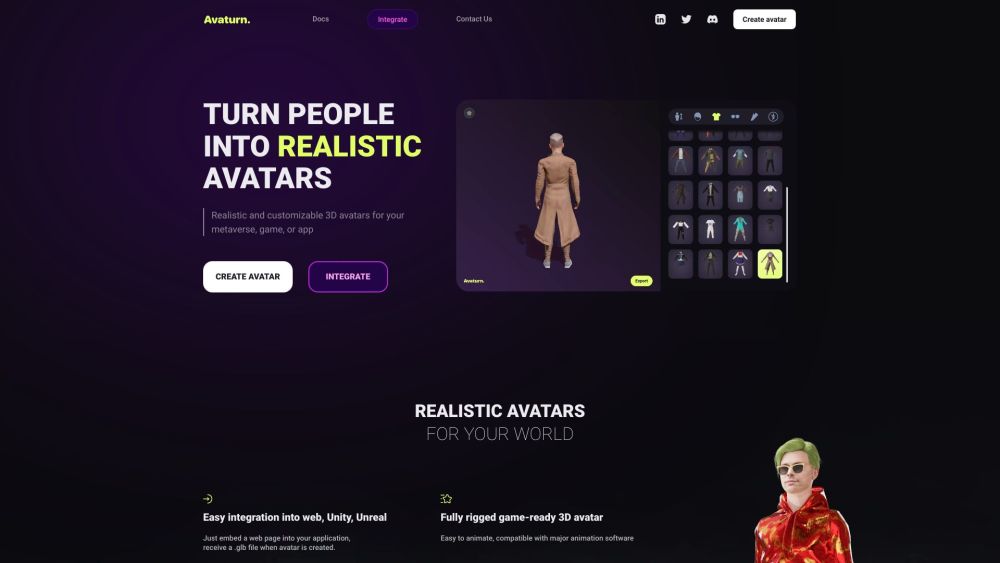
Avaturn website preview

Avaturn Website screenshot

Understanding Avaturn

Avaturn is an advanced 3D avatar creation tool that enables users to design highly realistic avatars by simply uploading a selfie. It offers extensive customization options, allowing users to tailor their avatars' features to their preferences. These avatars can be exported as 3D models for integration into various platforms, including games, apps, and metaverse environments.

Steps to Create an Avatar with Avaturn

Creating a lifelike 3D avatar with Avaturn is straightforward. Start by taking a selfie and uploading it to the Avaturn platform. Leveraging its powerful generative AI, Avaturn converts the photo into a detailed 3D avatar. Users can then personalize the avatar by adjusting its body shape, hairstyle, clothing, and accessories. The final avatar can be exported for use in popular 3D environments like Blender, Unity, and Unreal Engine, among others.

Key Features of Avaturn

AI-powered conversion of selfies into detailed 3D avatars

Extensive customization options for physical traits and accessories

Exportable 3D models compatible with various 3D software

Animation-ready avatars with standard humanoid rigs and ARKit blendshapes

Seamless integration into game and metaverse development projects

Applications of Avaturn

Crafting realistic avatars for virtual reality experiences

Personalizing augmented reality applications using custom avatars

Enhancing AI animations with realistic avatar details

Developing customized characters for games and apps

Boosting VTubing content with high-quality avatars

Product source: Avaturn official website. Check the provider for current plans, limits and availability.

FAQ

Avaturn questions and answers

Product context and practical checks for evaluating Avaturn.

What is Avaturn used for?

Avaturn is a realistic 3D avatar creator that allows users to create lifelike avatars using just a selfie. It offers customizable options for the avatar's appearance and allows users to export the avatar as a 3D model for use in various environments like games, apps, or the metaverse.

How do I get started with Avaturn?

Open the official Avaturn website and identify the workflow that matches your task. Use a short shot with one subject and one camera movement. Keep the prompt and duration constant, then compare usable seconds and the number of regenerations.

Which capabilities are described for Avaturn?

AI-powered conversion of selfies into detailed 3D avatarsExtensive customization options for physical traits and accessoriesExportable 3D models compatible with various 3D softwareAnimation-ready avatars with standard humanoid rigs and ARKit blendshapesSeamless integration into game and metaverse development projects

What projects can I evaluate Avaturn for?

Crafting realistic avatars for virtual reality experiencesPersonalizing augmented reality applications using custom avatarsEnhancing AI animations with realistic avatar detailsDeveloping customized characters for games and appsBoosting VTubing content with high-quality avatars Join the Avaturn Discord Connect with the Avaturn community on Discord: https://discord.com/invite/2xmxXv2SQk. For additional Discord information, click here (/discord/2xmxxv2sqk). Contact Avaturn Support For support or inquiries, visit the Contact Us page. Avaturn Login Access your Avaturn account here: https://hub.avaturn.me Sign Up for Avaturn Create an Avaturn account here: https://hub.avaturn.me/login/register Avaturn Pricing Explore Avaturn's pricing options: https://avaturn.me/pricing/ Avaturn on YouTube Check out Avaturn's videos on YouTube: https://www.youtube.com/@avaturn Avaturn on LinkedIn Connect with Avaturn on LinkedIn: https://www.linkedin.com/company/28502076 Follow Avaturn on Twitter Stay updated with Avaturn's latest news on Twitter: https://twitter.com/avaturn_me

What should I compare before choosing a Avaturn plan?

Explore Avaturn's pricing options: https://avaturn.me/pricing/ Confirm current prices and allowances on the provider’s website before purchasing.

What inputs should I prepare for a Avaturn trial?

Compare text prompts, reference frames, source footage and audio support. Check duration, aspect ratio and whether the tool lets you keep a subject consistent between shots.

How can I check the quality of a Avaturn result?

Watch the entire clip for motion errors, distorted objects, changing identities, lip-sync problems and abrupt transitions. Inspect the downloaded file as well as the preview.

Which export options should I check in Avaturn?

Check export resolution, frame rate, aspect ratio, audio tracks and watermark rules. A good preview is not a substitute for an export that fits your publishing channel.

What is a practical way to test Avaturn against alternatives?

Use a short shot with one subject and one camera movement. Keep the prompt and duration constant, then compare usable seconds and the number of regenerations.

Where is the official Avaturn website?

The website linked from this profile is https://avaturn.me. Use the provider’s own documentation, account area and support channels to confirm current product details.

Visit Avaturn