AI Art Generator

Arting AI - Chrome Extension

Transform videos creatively with Arting AI Chrome Extension – unleash your artistic vision and enhance your content with ease!

Arting AI - Chrome Extension website preview

Arting AI - Chrome Extension Website screenshot

Discover Arting AI - Your Creative Chrome Extension

Arting AI is a cutting-edge Chrome extension designed to breathe life into your videos, igniting creativity and transforming ordinary content into extraordinary visual experiences.

Getting Started with Arting AI - Chrome Extension

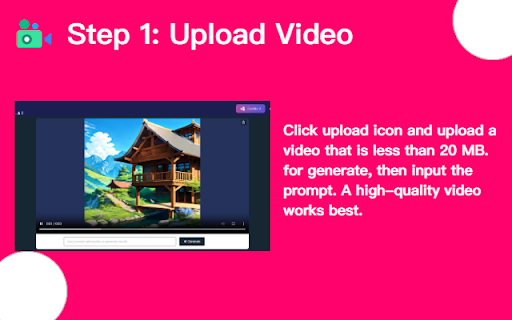
To begin, create an account, upload your videos, select from a variety of creative effects, and watch as your static videos evolve into dynamic masterpieces.

Key Features of Arting AI - Chrome Extension

Creative Video Transformations

Wide Range of Dynamic Effects

Practical Applications of Arting AI - Chrome Extension

Convert Ordinary Videos into Creative Works

Elevate Your Storytelling with Enhanced Visuals

Product source: Arting AI - Chrome Extension official website. Check the provider for current plans, limits and availability.

FAQ

Arting AI - Chrome Extension questions and answers

Product context and practical checks for evaluating Arting AI - Chrome Extension.

What is Arting AI - Chrome Extension used for?

Transform videos creatively with Arting AI Chrome Extension – unleash your artistic vision and enhance your content with ease!

How do I get started with Arting AI - Chrome Extension?

To begin, create an account, upload your videos, select from a variety of creative effects, and watch as your static videos evolve into dynamic masterpieces.

Which capabilities are described for Arting AI - Chrome Extension?

Creative Video TransformationsWide Range of Dynamic Effects

What projects can I evaluate Arting AI - Chrome Extension for?

Convert Ordinary Videos into Creative WorksElevate Your Storytelling with Enhanced Visuals

What should I compare before choosing a Arting AI - Chrome Extension plan?

Check Arting AI - Chrome Extension’s current pricing page for included usage, renewal terms and any credit charges. Compare the cost of a usable result, including retries, rather than assuming that account registration includes free usage.

What inputs should I prepare for a Arting AI - Chrome Extension trial?

Compare text prompts, reference frames, source footage and audio support. Check duration, aspect ratio and whether the tool lets you keep a subject consistent between shots.

How can I check the quality of a Arting AI - Chrome Extension result?

Watch the entire clip for motion errors, distorted objects, changing identities, lip-sync problems and abrupt transitions. Inspect the downloaded file as well as the preview.

Which export options should I check in Arting AI - Chrome Extension?

Check export resolution, frame rate, aspect ratio, audio tracks and watermark rules. A good preview is not a substitute for an export that fits your publishing channel.

What is a practical way to test Arting AI - Chrome Extension against alternatives?

Use a short shot with one subject and one camera movement. Keep the prompt and duration constant, then compare usable seconds and the number of regenerations.

Where is the official Arting AI - Chrome Extension website?

The website linked from this profile is https://chromewebstore.google.com/detail/sora-video-to-video-artin/aioieeioikmcgggaldfknjfoeihahfkb. Use the provider’s own documentation, account area and support channels to confirm current product details.

Visit Arting AI - Chrome Extension