AI Product Description Generator

Alta - AI Apps Builder

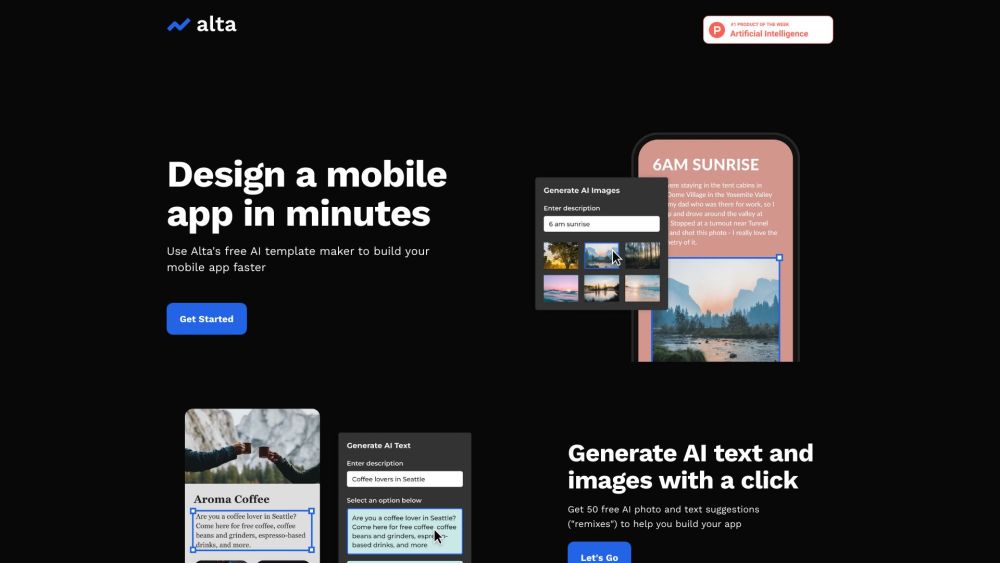
Create AI-powered chatbots, websites, and mobile apps without coding. Alta offers no-code design, data sync, and multi-platform publishing on web, iOS, and Android.

Alta - AI Apps Builder website preview

Alta - Build AI Powered Applications Website screenshot

What is Alta - AI Apps Builder?

Alta is a comprehensive platform designed for users to easily create AI-driven chatbots, websites, and mobile applications without any coding knowledge. It provides no-code tools that enable the design of applications, synchronization of data, and deployment across web, iOS, and Android platforms. Alta empowers users to build custom and intuitive AI-powered apps effortlessly.

How to use Alta - AI Apps Builder?

To get started with Alta, follow these steps: 1. Register for an account on Alta's official website. 2. Utilize the web canvas and drag-and-drop features to design your app screens. 3. Set up dynamic tables to manage and map your app's data. 4. Customize your app by integrating your logo, brand colors, and preferred fonts. 5. Monitor your app's performance and refine the user experience using real-time analytics. 6. Deploy your app on web, iOS, and Android platforms. 7. Make updates and enhancements to your app using Alta's no-code tools as needed.

Core Features of Alta - AI Apps Builder

Create AI chatbots, websites, and mobile apps without coding

Design app interfaces with drag-and-drop components

Set up dynamic tables to manage and integrate app data

Personalize applications with logos, branding, and typography

Utilize real-time analytics to enhance user experience

Publish applications on web, iOS, and Android platforms

Use Cases of Alta - AI Apps Builder

AI Chatbots

Website Development

Mobile App Development

Product source: Alta - AI Apps Builder official website. Check the provider for current plans, limits and availability.

FAQ

Alta - AI Apps Builder questions and answers

Product context and practical checks for evaluating Alta - AI Apps Builder.

What is Alta - AI Apps Builder used for?

Create AI-powered chatbots, websites, and mobile apps without coding. Alta offers no-code design, data sync, and multi-platform publishing on web, iOS, and Android.

How do I get started with Alta - AI Apps Builder?

To get started with Alta, follow these steps: 1. Register for an account on Alta's official website. 2. Utilize the web canvas and drag-and-drop features to design your app screens. 3. Set up dynamic tables to manage and map your app's data. 4. Customize your app by integrating your logo, brand colors, and preferred fonts. 5. Monitor your app's performance and refine the user experience using real-time analytics. 6. Deploy your app on web, iOS, and Android platforms. 7. Make updates and enhancements to your app using Alta's no-code tools as needed.

Which capabilities are described for Alta - AI Apps Builder?

Create AI chatbots, websites, and mobile apps without codingDesign app interfaces with drag-and-drop componentsSet up dynamic tables to manage and integrate app dataPersonalize applications with logos, branding, and typographyUtilize real-time analytics to enhance user experiencePublish applications on web, iOS, and Android platforms

What projects can I evaluate Alta - AI Apps Builder for?

AI ChatbotsWebsite DevelopmentMobile App Development Alta - AI Apps Builder Support Email & Customer Service Contact & Refund Contact etc. For more contact information, visit the contact us page(https://www.alta.so/contact) Alta - AI Apps Builder Company Alta - AI Apps Builder Company name: Alta Tools Inc. Alta - AI Apps Builder Login Alta - AI Apps Builder Login Link: https://app.alta.so Alta - AI Apps Builder Sign up Alta - AI Apps Builder Sign up Link: https://app.alta.so Alta - AI Apps Builder Pricing Alta - AI Apps Builder Pricing Link: https://www.alta.so/pricing-plans Alta - AI Apps Builder Facebook Alta - AI Apps Builder Facebook Link: https://www.facebook.com/altatools Alta - AI Apps Builder LinkedIn Alta - AI Apps Builder LinkedIn Link: https://www.linkedin.com/company/altatools Alta - AI Apps Builder Twitter Alta - AI Apps Builder Twitter Link: https://twitter.com/altatools Alta - AI Apps Builder Instagram Alta - AI Apps Builder Instagram Link: https://instagram.com/altatools

What should I compare before choosing a Alta - AI Apps Builder plan?

Alta - AI Apps Builder Pricing Link: https://www.alta.so/pricing-plans Confirm current prices and allowances on the provider’s website before purchasing.

What inputs should I prepare for a Alta - AI Apps Builder trial?

Look for text prompts, image references, masks or sketches as appropriate. Compare composition control, supported upload types and the ability to revise a selected area.

How can I check the quality of a Alta - AI Apps Builder result?

Inspect text, hands, edges, reflections and repeated objects at full size. Check that important product or brand details survive editing.

Which export options should I check in Alta - AI Apps Builder?

Compare pixel dimensions, transparency, file formats and any enlargement options. Confirm that the downloaded result works in your design or publishing software.

What is a practical way to test Alta - AI Apps Builder against alternatives?

Prepare a brief with a subject, composition, lighting and required output size. Test a first generation and a targeted revision to see how much control you retain.

Where is the official Alta - AI Apps Builder website?

The website linked from this profile is https://alta.so. Use the provider’s own documentation, account area and support channels to confirm current product details.

Visit Alta - AI Apps Builder