AI Lead Generation

Aimino - Chrome Extension

Aimino - Chrome Extension: Boost business growth with AI-powered insights and connections. Streamline networking and unlock new opportunities instantly.

Aimino - Chrome Extension website preview

Aimino - Chrome Extension Website screenshot

What is Aimino AI Chrome Extension?

Aimino is an AI-driven Chrome extension that assists professionals in discovering contacts, gaining valuable business insights, and nurturing stronger professional relationships using cutting-edge artificial intelligence.

How to use Aimino AI Chrome Extension?

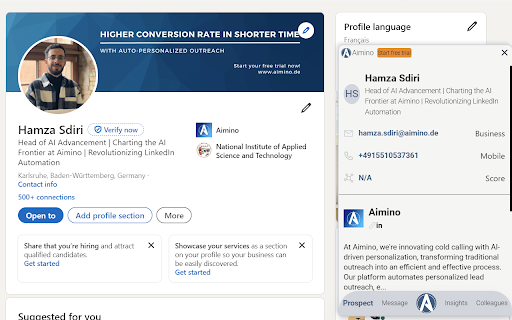
With Aimino, you can enrich your LinkedIn experience by finding verified contacts, explore relevant business data while browsing the web, craft tailored outreach messages effortlessly, and soon, you'll be able to automate repetitive tasks for even more efficiency in your workflow.

Key Features of Aimino AI Chrome Extension

AI-Driven Business Intelligence

Aimino delivers precise insights that help you identify key contacts and unlock business growth opportunities.

Contextualized Communication

Communicate effectively with culturally aware messaging tailored to your target audience.

Constant Evolution

Aimino continually updates its capabilities to stay ahead of industry trends and improve user experience.

Use Cases for Aimino AI Chrome Extension

Optimize LinkedIn Networking

Enhance your LinkedIn efforts by accessing verified contact data and actionable insights in real-time.

Effortless Contact Discovery on Websites

Seamlessly find contact information and company details as you browse the web, simplifying lead generation.

Craft Personalized Outreach

Create targeted and impactful outreach messages that resonate with your recipients using AI-powered personalization.

Automate Routine Tasks

Soon, Aimino will introduce features to automate mundane tasks, allowing you to focus on high-value activities and boost productivity.

Product source: Aimino - Chrome Extension official website. Check the provider for current plans, limits and availability.

FAQ

Aimino - Chrome Extension questions and answers

Product context and practical checks for evaluating Aimino - Chrome Extension.

What is Aimino - Chrome Extension used for?

Aimino - Chrome Extension: Boost business growth with AI-powered insights and connections. Streamline networking and unlock new opportunities instantly.

How do I get started with Aimino - Chrome Extension?

With Aimino, you can enrich your LinkedIn experience by finding verified contacts, explore relevant business data while browsing the web, craft tailored outreach messages effortlessly, and soon, you'll be able to automate repetitive tasks for even more efficiency in your workflow.

Which capabilities are described for Aimino - Chrome Extension?

AI-Driven Business IntelligenceAimino delivers precise insights that help you identify key contacts and unlock business growth opportunities.Contextualized CommunicationCommunicate effectively with culturally aware messaging tailored to your target audience.Constant EvolutionAimino continually updates its capabilities to stay ahead of industry trends and improve user experience.

What projects can I evaluate Aimino - Chrome Extension for?

Optimize LinkedIn NetworkingEnhance your LinkedIn efforts by accessing verified contact data and actionable insights in real-time.Effortless Contact Discovery on WebsitesSeamlessly find contact information and company details as you browse the web, simplifying lead generation.Craft Personalized OutreachCreate targeted and impactful outreach messages that resonate with your recipients using AI-powered personalization.Automate Routine TasksSoon, Aimino will introduce features to automate mundane tasks, allowing you to focus on high-value activities and boost productivity.

What should I compare before choosing a Aimino - Chrome Extension plan?

Check Aimino - Chrome Extension’s current pricing page for included usage, renewal terms and any credit charges. Compare the cost of a usable result, including retries, rather than assuming that account registration includes free usage.

What inputs should I prepare for a Aimino - Chrome Extension trial?

Identify the files, text or account connections your task needs. Confirm that the product accepts those inputs and offers controls for reviewing its work.

How can I check the quality of a Aimino - Chrome Extension result?

Test one representative task and inspect the result for accuracy and completeness. Record where manual corrections or extra tools are needed.

Which export options should I check in Aimino - Chrome Extension?

Check export formats, integrations and whether you can keep using your work outside the service. Test a real export before committing to a longer plan.

What is a practical way to test Aimino - Chrome Extension against alternatives?

Choose one task with a clear success condition. Keep the input consistent, record the time spent reviewing and compare the complete workflow cost.

Where is the official Aimino - Chrome Extension website?

The website linked from this profile is https://chromewebstore.google.com/detail/get-b2b-contact-details-f/kadobjiobmpmfpdflhnijfcocoddehll. Use the provider’s own documentation, account area and support channels to confirm current product details.

Visit Aimino - Chrome Extension