AI tool profile

AI Generator

Create videos & images in seconds with AI Generator! Turn text or images into professional visuals—free trial available!

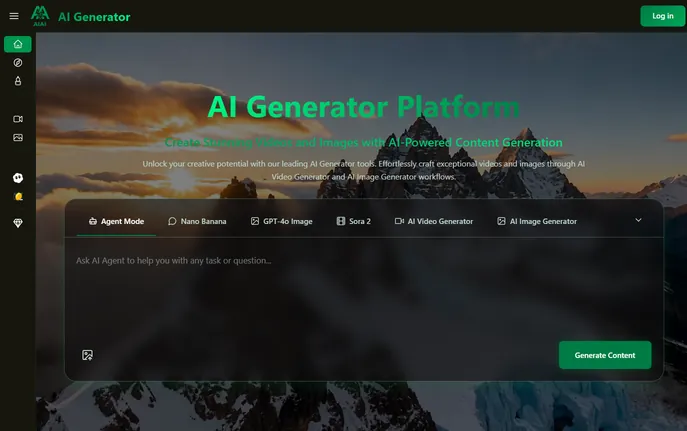
AI Generator website preview

What is AI Generator?

AI Generator is a next-generation artificial intelligence platform designed to simplify and elevate the process of creating high-impact visual content. By harnessing advanced AI technologies, it empowers users to turn simple inputs—like text or static images—into dynamic videos and lifelike visuals in moments. This innovative solution removes traditional hurdles such as costly production gear, complex editing software, or deep technical knowledge. Whether you're crafting compelling social media clips, immersive educational material, or artistic imagery, AI Generator leverages powerful machine learning models and natural language understanding to deliver polished, professional-grade results with minimal effort.

How to Use AI Generator

Getting started with AI Generator is fast and user-friendly. Begin by signing up for a free account and receive trial credits to explore the full suite of tools at no cost. From there, select from four versatile creation modes: Text to Video for turning descriptive prompts into fully animated scenes, Image to Video for adding motion and cinematic effects to still photos, Text to Image for generating unique artwork from words, or Image to Image for reimagining existing visuals with new styles and enhancements. Enter your prompt or upload your file, adjust preferences like tone, duration, resolution, and visual style, then let the AI handle the rest.

To get the most out of AI Generator, use detailed and expressive descriptions that capture the mood, setting, and key elements you envision. The system’s intelligent algorithms analyze your input for context and creative intent, producing outputs that closely match your idea. Most generations complete within seconds to a few minutes, allowing for rapid experimentation and refinement until you achieve the perfect result.

Key Features of AI Generator

  • Dual AI Creation Engine: Seamlessly switch between AI-powered video and image generation in one integrated environment. Create fluid animations with realistic movement and transitions, or produce hyper-detailed stills with artistic depth and precision.
  • Intelligent Prompt Interpretation: Utilize state-of-the-art natural language processing to convert written ideas into accurate, visually rich content. The AI understands nuanced instructions, enabling precise control over composition, atmosphere, and aesthetic direction.
  • Flexible Generation Modes: Access dedicated workflows for Text to Video, Image to Video, Text to Image, and Image to Image tasks. Each mode is tailored for specific creative goals while maintaining an intuitive, consistent interface for all experience levels.
  • Selectable AI Models: Choose from multiple cutting-edge AI models optimized for different genres, quality tiers, and output formats. Pick the best model for your project—whether realism, stylization, or speed is your priority.
  • High-Speed Rendering Infrastructure: Experience near-instant content creation thanks to a robust, cloud-based processing engine. Generate high-resolution videos and images quickly without sacrificing fidelity or detail.

These features collectively enable dramatic improvements in workflow efficiency, reduce production costs, and open up new creative possibilities for individuals and organizations alike.

Why Choose AI Generator?

AI Generator has emerged as a leading force in AI-driven content creation, trusted by creators, marketers, educators, and enterprises across the globe. It breaks down barriers to professional-quality visual production by offering an accessible, powerful alternative to time-consuming manual processes. With its proven ability to generate coherent motion, accurate details, and stylistically consistent outputs, the platform meets the demands of modern branding and storytelling standards.

Recognized on aitop-tools.com as a top-tier AI creative tool, AI Generator integrates smoothly into existing workflows and scales effortlessly—from solo creators to large teams managing high-volume content calendars. Backed by enterprise-level security, flexible credit-based plans, and a generous free trial, it's the smart choice for anyone looking to boost creativity, save time, and stay ahead in a competitive digital landscape.

Use Cases and Applications

Marketers use AI Generator to rapidly produce attention-grabbing ads, product showcases, and campaign videos that maintain brand consistency while slashing production timelines and budgets. Digital creators rely on it to design vibrant thumbnails, animated reels, and original visual assets that enhance audience engagement across platforms. Educators and e-learning developers leverage the tool to build interactive lessons, explainer videos, and dynamic illustrations that improve comprehension and retention.

Corporate teams apply AI Generator for internal training modules, executive presentations, and company updates enhanced with professional visuals. Artists and designers experiment with generative techniques using the Image to Image and style transfer functions, unlocking endless variations and pushing the boundaries of digital art and concept development.

Product source: AI Generator official website. Check the provider for current plans, limits and availability.

FAQ

AI Generator questions and answers

Product context and practical checks for evaluating AI Generator.

What is AI Generator used for?

Create videos & images in seconds with AI Generator! Turn text or images into professional visuals—free trial available!

How do I get started with AI Generator?

Getting started with AI Generator is fast and user-friendly. Begin by signing up for a free account and receive trial credits to explore the full suite of tools at no cost. From there, select from four versatile creation modes: Text to Video for turning descriptive prompts into fully animated scenes, Image to Video for adding motion and cinematic effects to still photos, Text to Image for generating unique artwork from words, or Image to Image for reimagining existing visuals with new styles and enhancements. Enter your prompt or upload your file, adjust preferences like tone, duration, resolution, and visual style, then let the AI handle the rest.To get the most out of AI Generator, use detailed and expressive descriptions that capture the mood, setting, and key elements you envision. The system’s intelligent algorithms analyze your input for context and creative intent, producing outputs that closely match your idea. Most generations complete within seconds to a few minutes, allowing for rapid experimentation and refinement until you achieve the perfect result.

Which capabilities are described for AI Generator?

Dual AI Creation Engine: Seamlessly switch between AI-powered video and image generation in one integrated environment. Create fluid animations with realistic movement and transitions, or produce hyper-detailed stills with artistic depth and precision. Intelligent Prompt Interpretation: Utilize state-of-the-art natural language processing to convert written ideas into accurate, visually rich content. The AI understands nuanced instructions, enabling precise control over composition, atmosphere, and aesthetic direction. Flexible Generation Modes: Access dedicated workflows for Text to Video, Image to Video, Text to Image, and Image to Image tasks. Each mode is tailored for specific creative goals while maintaining an intuitive, consistent interface for all experience levels. Selectable AI Models: Choose from multiple cutting-edge AI models optimized for different genres, quality tiers, and output formats. Pick the best model for your project—whether realism, stylization, or speed is your priority. High-Speed Rendering Infrastructure: Experience near-instant content creation thanks to a robust, cloud-based processing engine. Generate high-resolution videos and images quickly without sacrificing fidelity or detail. These features collectively enable dramatic improvements in workflow efficiency, reduce production costs, and open up new creative possibilities for individuals and organizations alike.

What projects can I evaluate AI Generator for?

Marketers use AI Generator to rapidly produce attention-grabbing ads, product showcases, and campaign videos that maintain brand consistency while slashing production timelines and budgets. Digital creators rely on it to design vibrant thumbnails, animated reels, and original visual assets that enhance audience engagement across platforms. Educators and e-learning developers leverage the tool to build interactive lessons, explainer videos, and dynamic illustrations that improve comprehension and retention.Corporate teams apply AI Generator for internal training modules, executive presentations, and company updates enhanced with professional visuals. Artists and designers experiment with generative techniques using the Image to Image and style transfer functions, unlocking endless variations and pushing the boundaries of digital art and concept development.

How does AI Generator handle dual ai creation engine?

Dual AI Creation Engine: Seamlessly switch between AI-powered video and image generation in one integrated environment. Create fluid animations with realistic movement and transitions, or produce hyper-detailed stills with artistic depth and precision.

How does AI Generator handle intelligent prompt interpretation?

Intelligent Prompt Interpretation: Utilize state-of-the-art natural language processing to convert written ideas into accurate, visually rich content. The AI understands nuanced instructions, enabling precise control over composition, atmosphere, and aesthetic direction.

What should I compare before choosing a AI Generator plan?

Check AI Generator’s current pricing page for included usage, renewal terms and any credit charges. Compare the cost of a usable result, including retries, rather than assuming that account registration includes free usage.

What inputs should I prepare for a AI Generator trial?

Compare text prompts, reference frames, source footage and audio support. Check duration, aspect ratio and whether the tool lets you keep a subject consistent between shots.

How can I check the quality of a AI Generator result?

Watch the entire clip for motion errors, distorted objects, changing identities, lip-sync problems and abrupt transitions. Inspect the downloaded file as well as the preview.

Where is the official AI Generator website?

The website linked from this profile is https://aiaigenerator.ai/. Use the provider’s own documentation, account area and support channels to confirm current product details.

Visit AI Generator