Translate

AI TranslateDocs

AI TranslateDocs: Translate PDFs, Word, Excel, PPT, and more into 130+ languages. AI-driven OCR ensures perfect layout preservation.

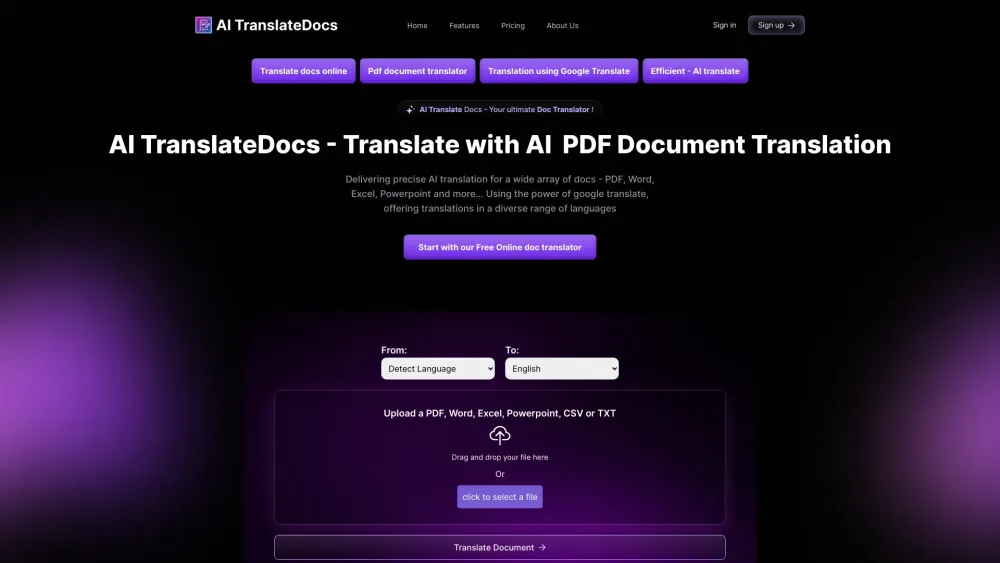
AI TranslateDocs website preview
```html

AI TranslateDocs Website screenshot

Discover AI TranslateDocs

AI TranslateDocs revolutionizes document translation with cutting-edge AI technology, supporting over 130 languages. Whether you need to translate PDFs, Word documents, Excel spreadsheets, PowerPoint presentations, CSV files, or plain text, AI TranslateDocs ensures accurate and efficient translations. Its integrated OCR (Optical Character Recognition) technology maintains the original layout of your documents, making it perfect for professional use.

Getting Started with AI TranslateDocs

Using AI TranslateDocs is straightforward. Upload your document in formats such as PDF, Word, Excel, PowerPoint, CSV, or TXT. Select the language you wish to translate your document into and hit 'Translate Document'. You can also drag and drop your files for an even quicker upload process.

Key Features of AI TranslateDocs

Advanced AI-Powered Translations

Experience the power of AI in translating documents with unparalleled accuracy and speed.

Support for Over 130 Languages

Translate your documents into more than 130 languages, making global communication seamless.

Preserve Document Layout with OCR

AI TranslateDocs uses OCR technology to ensure that the original formatting and layout of your documents are preserved, even in scanned files.

Ideal Applications of AI TranslateDocs

Legal Document Translations

Translate contracts, agreements, and other legal documents while maintaining their integrity.

Business Contract Translations

Ensure clear and precise translation of business documents for international operations.

Academic Transcript Translations

Accurately translate academic transcripts and certificates for educational and professional purposes.

  • Customer Support and Contact

    For more details or assistance, visit our support page.

  • About AI TranslateDocs

    Learn more about our company, AscentApp Software LLP, on our about us page.

  • Login to AI TranslateDocs

    Access your account here: Login.

  • Sign Up for AI TranslateDocs

    Not a user yet? Join us now: Register.

  • AI TranslateDocs Pricing

    Explore our pricing options at: Pricing.

  • AI TranslateDocs on YouTube

    Check out our features in action: Watch on YouTube.

```

Product source: AI TranslateDocs official website. Check the provider for current plans, limits and availability.

FAQ

AI TranslateDocs questions and answers

Product context and practical checks for evaluating AI TranslateDocs.

What is AI TranslateDocs used for?

AI TranslateDocs: Translate PDFs, Word, Excel, PPT, and more into 130+ languages. AI-driven OCR ensures perfect layout preservation.

How do I get started with AI TranslateDocs?

Using AI TranslateDocs is straightforward. Upload your document in formats such as PDF, Word, Excel, PowerPoint, CSV, or TXT. Select the language you wish to translate your document into and hit 'Translate Document'. You can also drag and drop your files for an even quicker upload process.

Which capabilities are described for AI TranslateDocs?

Advanced AI-Powered TranslationsExperience the power of AI in translating documents with unparalleled accuracy and speed.Support for Over 130 LanguagesTranslate your documents into more than 130 languages, making global communication seamless.Preserve Document Layout with OCRAI TranslateDocs uses OCR technology to ensure that the original formatting and layout of your documents are preserved, even in scanned files.

What projects can I evaluate AI TranslateDocs for?

Legal Document TranslationsTranslate contracts, agreements, and other legal documents while maintaining their integrity.Business Contract TranslationsEnsure clear and precise translation of business documents for international operations.Academic Transcript TranslationsAccurately translate academic transcripts and certificates for educational and professional purposes. Customer Support and Contact For more details or assistance, visit our support page. About AI TranslateDocs Learn more about our company, AscentApp Software LLP, on our about us page. Login to AI TranslateDocs Access your account here: Login. Sign Up for AI TranslateDocs Not a user yet? Join us now: Register. AI TranslateDocs Pricing Explore our pricing options at: Pricing. AI TranslateDocs on YouTube Check out our features in action: Watch on YouTube.

What should I compare before choosing a AI TranslateDocs plan?

Explore our pricing options at: Pricing. Confirm current prices and allowances on the provider’s website before purchasing.

What inputs should I prepare for a AI TranslateDocs trial?

Identify the files, text or account connections your task needs. Confirm that the product accepts those inputs and offers controls for reviewing its work.

How can I check the quality of a AI TranslateDocs result?

Test one representative task and inspect the result for accuracy and completeness. Record where manual corrections or extra tools are needed.

Which export options should I check in AI TranslateDocs?

Check export formats, integrations and whether you can keep using your work outside the service. Test a real export before committing to a longer plan.

What is a practical way to test AI TranslateDocs against alternatives?

Choose one task with a clear success condition. Keep the input consistent, record the time spent reviewing and compare the complete workflow cost.

Where is the official AI TranslateDocs website?

The website linked from this profile is https://aitranslatedocs.com. Use the provider’s own documentation, account area and support channels to confirm current product details.

Visit AI TranslateDocs